Understanding My Merchant Statement in 2026: A Plain-English Guide
Need help understanding my merchant statement 2026? Learn how to decode processing fee labels, reconcile bank deposits, and uncover real processing savings.
Published

What if every charge on your merchant statement could be traced to a transaction, pricing rule, or documented adjustment? If you’re focused on understanding my merchant statement 2026, you’re probably looking at unfamiliar fee labels and wondering why the statement total doesn’t match your deposits. That confusion is real. But an unfamiliar fee isn’t automatically improper, and a deposit total rarely tells the whole story.
The answer is in the arithmetic. This guide explains the statement’s main sections, translates common fee labels into plain English, and shows how to compare sales, refunds, processing charges, and deposits. You’ll learn what to check when a charge looks duplicated or unexpected, and which records to compare before deciding whether your pricing needs a closer look.
Start with the numbers, not assumptions. A clear reconciliation can show where the money went and which questions are worth asking. Once you understand your costs, a merchant statement review can help identify potential savings under available pricing models, including interchange-plus.
Key Takeaways
- Understanding my merchant statement 2026 starts with identifying the statement period, sales totals, fees, adjustments, and net funding.
- Separate interchange, card-network assessments, processor markup, account fees, and adjustments instead of treating every charge as the same cost.
- Use statement details, processor reports, and bank activity to trace how sales, refunds, fees, and deposits fit together.
- An unfamiliar fee is a reason to investigate, not proof of an error. Compare the entry with your agreement and transaction records.
- Gather recent statements, your processing agreement, and relevant transaction reports to prepare for a structured review of costs and potential savings.
Table of Contents
- Understanding a Merchant Statement in 2026: What the Summary Actually Shows
- Merchant Statement Fees Explained: Trace Each Line to Its Source
- Reconcile Merchant Statement Fees With Sales, Refunds, and Deposits
- Is a Merchant Statement Fee Wrong? Verify Before You Assume
- Turn Your 2026 Merchant Statement Into a Clear Next Step
Understanding a Merchant Statement in 2026: What the Summary Actually Shows
A merchant statement is a period-based record of card activity, processing charges, and adjustments. It brings together what was processed during a set date range and how that activity was reported and funded. The statement can help you see the moving parts behind card payments, but layouts vary. Processors use different section names, groupings, and summaries, so compare the labels on your statement with its transaction details and your processing agreement.
Start at the top and find the statement period. Check that its start and end dates match the activity you want to review. Then locate gross sales or volume, transaction counts, refunds, adjustments, total fees, and any net funding figure. Some statements split these figures by card type or transaction category; others combine them. A label such as “volume” may refer to processed sales before refunds, so don’t assume it means the amount deposited in your bank.
Gross card sales are the processed sales total, processing fees are charges for handling those payments, and net deposits are funding movements sent to your bank. Those figures are related, but they aren’t interchangeable. The broader Merchant services setup behind card acceptance helps explain why a statement can include activity and charges that don’t appear as one simple deposit total. For understanding my merchant statement 2026, keep each figure in its own category before comparing the math.
Which statement totals should you read first?
Read the dates first, then note the key totals before trying to reconcile them. Record gross volume, refunds, adjustments, fees, transaction counts, and the net amount shown, if the statement provides one. Look for footnotes or separate summary pages explaining how the processor groups activity. One report may show refunds separately, while another subtracts them from sales. The same label can also mean different things across processors.
- Statement period: The dates covered by the report.
- Gross volume and count: Card sales processed and the number of transactions, as defined by that statement.
- Refunds and adjustments: Entries that change the amount attributed to sales or funding.
- Fees and net funding: Charges shown for processing, and any reported funding total.
How a merchant statement differs from a deposit report
A statement summarizes processing activity and associated charges for its reporting period. A bank deposit report, or your bank activity, shows funding movements and when they arrived. Those records won’t always match line for line: processing dates and deposit dates can fall in different periods, while holds, refunds, reversals, or adjustments can change the timing or amount of funding. Compare the covered dates and individual entries before treating a mismatch as an error.
Keep the statement, processor activity reports, and bank records side by side. This gives you a starting point for tracing totals without confusing sales volume with cash received. If a summary uses a term you don’t recognize, check the statement’s detail pages and your agreement for its definition. First understand what each total includes, then decide whether the arithmetic adds up.
Merchant Statement Fees Explained: Trace Each Line to Its Source
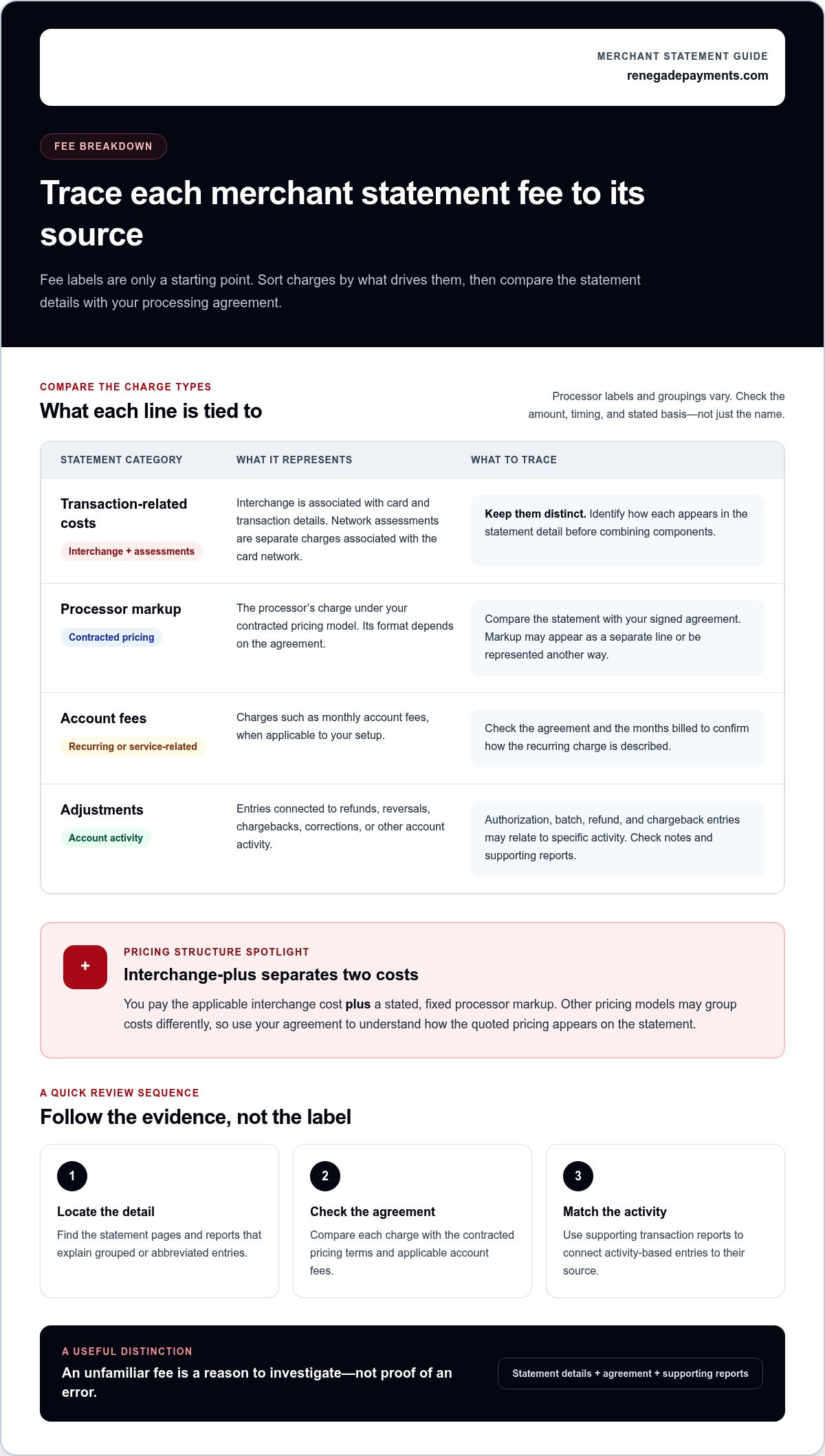
A fee label is only a starting point. To understand what you’re paying, sort statement entries by what drives them, then compare each charge with the detailed statement pages and your signed processing agreement. The name may be abbreviated or grouped with other costs. The amount, timing, and stated basis can tell you more than the label alone.
- Transaction-related costs: Charges tied to processing card payments, including interchange and card-network assessments.
- Processor markup: The processor’s charge under your contracted pricing model. Its format depends on that agreement.
- Account fees: Recurring or service-related entries, such as monthly account charges, when applicable to your setup.
- Adjustments: Entries connected to refunds, reversals, chargebacks, corrections, or other account activity.
What are interchange, assessments, and processor markup?
Interchange is a transaction cost associated with the card and transaction details. Network assessments are separate charges associated with the card network. They aren’t another name for interchange. The processor’s markup is a distinct charge set by the merchant’s contracted pricing structure. Identify how each appears on your statement before combining the components.
With interchange-plus pricing, you pay the applicable interchange cost plus a stated, fixed processor markup. That structure separates the underlying transaction cost from the processor’s charge. Other pricing models may group costs differently, so use your agreement to understand how the quoted pricing is reflected in the statement. The word “markup” may appear as a separate line or be represented another way, depending on the terms.
How to read recurring fees and transaction adjustments
Recurring and transaction-level entries need different checks. Compare a monthly charge with the agreement and the months billed. Authorization, batch, refund, and chargeback entries may relate to specific activity. Check statement notes and supporting reports for the date, count, amount, and basis. An unfamiliar label calls for verification, not an immediate conclusion that the charge is improper.
Use this quick trace for each line you don’t recognize:
- Find the detail: Check whether the statement breaks the fee down by transaction, date, card category, or service period.
- Check the agreement: Look for the matching fee description, pricing method, and terms that explain how it’s calculated.
- Compare the activity: Match transaction-related charges to processing records, and recurring charges to the billed period.
If the label still doesn’t explain the charge, note what you can verify and what remains unclear. That gives you a precise question to resolve instead of a guess. For a structured review of fee categories and potential savings, Renegade Payments offers a complimentary merchant statement savings analysis.
Reconcile Merchant Statement Fees With Sales, Refunds, and Deposits
A deposit total won’t prove that your processing math is right or wrong by itself. Reconcile in order: start with card activity, account for anything that changed it, then compare the resulting funding with bank records. For understanding my merchant statement 2026, keep the statement, processor reports, and bank activity together. Each shows a different part of the trail.
A practical sequence for checking statement totals
Use the same reporting period as your starting point, but track transaction dates and deposit dates separately. Don’t force records with different dates into a false match. Work through the numbers step by step:
- Match the activity: Compare the statement period with processor transaction or batch reports. Confirm the sales totals and transaction records cover the dates you’re checking.
- Subtract refunds: Find refunds in the reports and statement. Check whether they appear as reductions to sales, separate debits, or another entry.
- Account for other changes: Identify reversals, chargebacks, and adjustments. Note each amount and whether it increases or reduces the amount expected to be funded.
- Apply processing fees: Use the fees shown for the period and follow the statement’s treatment of them. Don’t subtract them twice if the reported net already includes them.
- Compare with bank activity: Match expected funding to deposits by amount and date. Check whether funding arrived in separate deposits or remains pending.
Hypothetical example: A statement shows $1,200 in gross card sales, $80 in refunds, a $15 debit adjustment, and $30 in processing fees. If those entries are all deducted before funding, the expected net is $1,075: $1,200 minus $80, $15, and $30. These figures are for illustration only, not industry averages. If the bank shows two related deposits of $900 and $175, their combined amount matches the expected net. Still, verify their dates and transaction records before treating them as the funding for this statement period.
Why statement totals may not match bank deposits
Processing and funding don’t always share the same cutoff. A transaction near the end of a statement period may be deposited after that period closes. Funding may also arrive in separate deposits, remain pending, or reflect an adjustment that appears on a different report. Refunds and reversals can affect the amount or timing too. A mismatch is a signal to trace the records, not automatic proof of an error.
For any unresolved difference, write down the amount, transaction or deposit date, and related report entry. Keep the statement page and transaction details beside that note. This creates a clear trail for investigating the gap and helps you avoid confusing sales volume with money actually funded to your bank.
Is a Merchant Statement Fee Wrong? Verify Before You Assume
An unfamiliar fee label is a reason to investigate, not proof of misconduct. Processors can use different names for similar entries, and a charge may reflect a contracted service or transaction. Check its description, amount, timing, and basis before drawing a conclusion. Understanding my merchant statement 2026 means asking whether the charge matches the records and agreement, not judging it by its label alone.
Which statement items deserve a closer look?
Focus on entries that look duplicated, change unexpectedly, or lack a clear explanation in the statement or agreement. Compare the current amount and timing with prior statements, allowing for changes in processing activity. Record the exact line label, date, amount, and related transaction details. That evidence makes it easier to distinguish an explained change from a genuine discrepancy.
| Entry type | What to check |
|---|---|
| Expected recurring entry | Compare the label, amount, and billing period with the signed agreement and prior statements. |
| Variable transaction cost | Check the transaction details and pricing terms that determine the charge. |
| Item needing verification | Investigate duplicate-looking charges, unexplained changes, or entries without a clear basis. |
How to compare processing pricing without misleading math
Effective cost comparisons only mean something when the periods and activity are comparable. Use the same length of time, similar card sales volume, and a similar transaction mix. Include the full set of processing costs shown in the records, not just one headline rate. If the statement itemizes them, separate interchange and network costs from the processor’s markup. Differences in refunds, transaction sizes, or card types can shift the total even when the pricing terms haven’t changed.
For example, comparing a month with mostly in-person card sales against one with more online transactions may distort the result. First confirm that both statements cover equivalent periods and include the same fee categories. Then calculate total processing costs against card sales using a consistent method. Review the agreement too, since a percentage alone may not capture per-transaction or account charges.
Checkout pricing is a separate question from statement reconciliation. If you’re evaluating distinct cash and card prices, read the dual pricing payment processing guide for context on pricing practices.
For a clearer read on your fee categories and potential savings, request a complimentary merchant statement savings analysis.
Turn Your 2026 Merchant Statement Into a Clear Next Step
Once you can read the statement, use it to make a grounded decision. Gather records that show how your processing works across a representative period, then compare the charges with your agreement and transaction activity. Understanding my merchant statement 2026 is not just about spotting unfamiliar labels. It’s about knowing which costs are explained, which details need clarification, and whether your pricing model fits your business.
What to gather before requesting a statement review
Good records make a review more useful. Choose recent statements that reflect ordinary business activity, rather than relying on one unusual period alone. Include the documents that explain the charges and the reports that show how transactions moved through processing and into your bank account.
- Recent merchant statements: Include the fee pages and summaries for representative business activity.
- Processing agreement: Keep the signed terms available so listed charges can be compared with the agreed pricing.
- Relevant reports: Add processor transaction or batch reports and deposit records when they help explain a specific question.
- Carefully prepared copies: Remove unnecessary sensitive information before sharing financial documents, while keeping statement dates, fee descriptions, and amounts visible.
If one line looks unusual, mark it and note what you want to understand. A clear question tied to a specific entry is more useful than a general concern that fees seem high.
What a transparent review should help you understand
A structured statement review should organize the numbers, not make assumptions for you. It can clarify which listed charges relate to transactions, network assessments, processor markup, or other account items. It should also use statement evidence to examine inconsistencies and show how the pricing terms connect to actual processing activity.
- Fee categories: See which costs are itemized and how they relate to the agreement.
- Potential discrepancies: Identify entries that need more explanation by comparing dates, amounts, and supporting records.
- Pricing fit: Consider available models against your actual activity, including interchange-plus, where interchange costs are separated from a clear, fixed processor markup.
Dual pricing is another distinct model, with separate cash and card prices shown at checkout. Whether you compare it with interchange-plus or your current arrangement, base the decision on your statement and business needs, not a headline claim or a promised outcome.
Renegade Payments offers a complimentary merchant-statement savings analysis to identify processing costs and potential savings under available pricing models. Request your statement savings analysis and put the numbers to work.
Make Your Next Processing Decision With Confidence
Understanding my merchant statement 2026 gives you a stronger starting point for deciding what to do next. Use that clarity to move from spotting questions to making a deliberate choice about how your business accepts payments. The right next step isn’t automatically changing providers or pricing. It’s getting a clear view of your current costs, then weighing the options against the way your business actually processes payments.
Renegade Payments provides a complimentary review of existing merchant processing statements to identify costs and potential savings. If you’re considering a different approach, compare interchange-plus, which separates interchange costs from a fixed processor markup, with dual pricing, which displays distinct cash and card prices at checkout.
Request your complimentary merchant statement savings analysis and take the next step with a clearer view of your processing. You’re in a stronger position when the numbers are understood and the decision is yours.
Frequently Asked Questions
How often should I review my merchant statement?
Review each statement monthly when it becomes available, and revisit it after a meaningful change in how you take payments. A regular routine helps you notice a new line item or a shift in activity before several periods pile up. For understanding my merchant statement 2026, make a simple log of questions and explanations beside each statement. If your business is seasonal, compare similar operating periods rather than relying only on month-to-month changes.
Are a merchant statement and a processing invoice the same thing?
Not always. A merchant statement usually reports processing activity and charges for a period, while an invoice can refer to a bill requesting payment for specific charges. Some processors may use these terms differently or put both reporting and billing details in one document. Check whether the document lists transactions and funding, requests payment, or both. The document’s contents and your agreement matter more than its title.
What does qualified or non-qualified mean on a merchant statement?
These labels usually refer to how a transaction is categorized under a processor’s pricing model, and the exact criteria can vary. A transaction may receive a different category based on factors defined in the processor’s terms, such as card or transaction details. Don’t assume the labels have one universal meaning. Find the pricing schedule in your agreement and compare its criteria with the processor’s explanation for the transactions in question.
Why can the same fee label change from one month to another?
The label may stay the same while the amount changes because the underlying activity or billing basis changed. A transaction-based charge can vary with transaction count; a recurring charge may differ if the billed period or account service changed. Processors may also revise how they group or display entries. Compare the fee’s calculation basis, transaction details, and period before deciding whether the change needs follow-up.
Can a merchant statement show chargebacks and refunds?
It can, but the placement and timing depend on how the processor reports those events. A refund returns funds to a customer, while a chargeback is a disputed payment handled through a separate process. They may appear as distinct entries, in transaction details, or on a report outside the statement summary. Check the related transaction reference and event date so you don’t mistake a chargeback for a routine refund.
What should I do if I find a possible error on my statement?
Save the statement and supporting records, then write down the exact entry, amount, date, and why it appears inconsistent. Check the transaction detail and agreement before raising the issue. Send a focused question through the processor’s documented support channel and keep its response with your records. If the entry relates to a disputed transaction, review any instructions and response deadlines provided in the relevant account or dispute notice.
Can I compare merchant statements from two different processors?
Yes, but compare equivalent periods and include the full processing cost, not just the headline rate. Differences in transaction mix, sales volume, refunds, and billing categories can skew a quick comparison. Use each processor’s agreement to identify which charges are included, and note any cost that appears in one format but is grouped in another. A side-by-side comparison is useful only when the underlying activity and cost categories are aligned.
Frequently Asked Questions
Clear, straightforward answers about payment processing rules, rates, and terms.
Get your free savings
analysis in 24 hours
Upload a recent processing statement and we'll show you exactly how much you can save. No commitment, no pressure, no sales pitch.