How to Read a Merchant Processing Statement: A Step-by-Step Guide
Learn how to read merchant processing statement reports, decode hidden fees, trace net deposits, and spot processor markup with our clear, step-by-step guide.
Published

Why can a strong sales month produce a deposit that looks smaller than expected? The explanation may be in statement labels, reporting dates, and deductions that aren’t obvious at first glance. If you’re searching “how to read merchant processing statement,” start with one rule: follow the money in layers rather than relying on a single total.
It makes sense to question a mismatch. Sales totals, processing fees, adjustments, and deposits may appear in different sections, and a processor’s markup may sit alongside charges set by card networks. To make a useful comparison, identify what each figure covers and compare the same reporting periods.
This guide shows you how to trace reported sales to deductions and settlements, identify the statement’s main sections, and distinguish interchange, network assessments, and processor markup. You’ll also learn what to gather for a statement review. Start with the totals, then examine the pricing model and supporting details. Clear arithmetic is more useful than guessing from unfamiliar labels.
Key Takeaways
- Understand what a merchant processing statement reports and how it differs from a customer’s credit card statement.
- Follow a step-by-step approach to how to read merchant processing statement details, starting with account information and reporting dates.
- Distinguish network and interchange costs from processor markups and account charges, even when statement labels vary.
- Compare equivalent reporting periods to spot new charges, recurring fees, reversals, and changes in transaction activity.
- Document unclear items and check bookkeeping records for timing differences before requesting a statement review.
Table of Contents
What a Merchant Processing Statement Shows, and What It Does Not
A merchant processing statement summarizes payment activity and related deductions for a reporting period. It’s an account record from the company that processes your card payments, not a customer-facing credit card statement. Your customer’s statement records their account activity. Yours reports transactions processed for your business, associated charges, and settlement information.
A merchant statement helps you trace payment activity, but it may not explain every deposit that reaches your bank. A bank deposit can combine transactions or reflect timing differences that the processor reports separately. Use the statement as one record to reconcile against your bank activity, not as a direct copy of it.
The Merchant account overview offers background on how these accounts support card payments. For your own review, focus on the figures and reporting period shown on your processor’s statement. Layouts and labels vary, so look for equivalent information rather than expecting every provider to use the same headings.
Which figures appear on a typical merchant statement?
Start by identifying the reporting period. Then locate the main activity and deduction figures. They may appear in different sections or under different names, but a typical statement may include:
- Sales volume: The value of payment transactions processed during the period.
- Transaction counts: The number of transactions, sometimes separated by payment type.
- Refunds and disputes: Amounts or activity that reverse or challenge earlier payments.
- Fees: Processing costs and other listed charges.
- Net settlement: Funds reported for settlement after applicable deductions and adjustments.
Record each figure’s exact label, date range, and role. Is it a period total or one line item? Does it show gross activity or an amount after deductions? Matching the meaning of each number before doing the math helps prevent misleading comparisons. This is a useful first habit when learning how to read merchant processing statement data.
Why statement totals may not match a bank deposit
Gross processing activity and net funds reported for settlement are different measures. Refunds, fees, timing, and settlement grouping can all affect how the figures compare. For example, a statement may cover transactions processed during one reporting period, while a bank deposit reflects funds settled on a different schedule. A deposit may also combine multiple batches.
Don’t assume a difference proves an error. Compare the statement dates with the deposit date, check for refunds or other deductions, and see whether settlement is grouped across batches. If the figures still don’t line up, note the amounts and labels you can’t explain. That creates a clear starting point for reconciliation.
How to Read a Merchant Processing Statement Step by Step
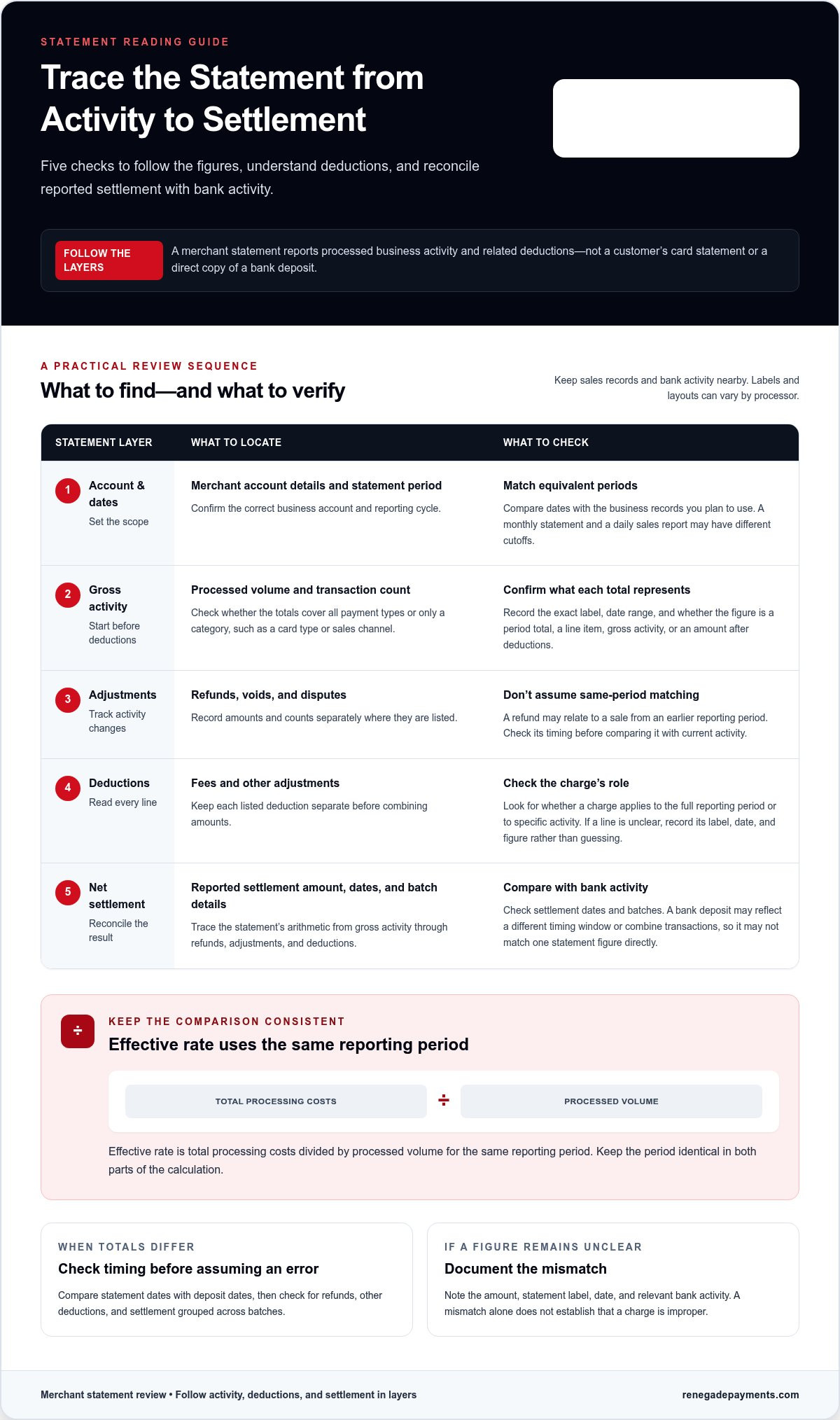
Don’t jump straight to the fee total. Work through the statement from account details to reported settlement, matching dates and figures as you go. Keep your sales records and bank activity nearby, then use this sequence to trace each amount.
Start with the statement period and account activity
Before interpreting totals, confirm which account the statement covers and which dates it includes. Match that period to the business records you plan to compare. A monthly statement and a daily sales report won’t line up automatically if their dates or reporting cutoffs differ.
- Verify the account and dates. Check the merchant account details and statement period. Confirm that you have the correct business account and reporting cycle.
- Find the gross activity. Locate total processed volume and transaction count. Check whether these figures cover all payment types or only a category, such as a specific card type or sales channel.
- Locate activity that changes the total. Find refunds, voids, and disputes where listed. Record their amounts and counts separately. A refund may relate to a sale from an earlier period, so don’t assume every adjustment matches a transaction from the same date range.
- Read every deduction. Follow the fees and other adjustments shown on the statement. Keep each line item separate at first. Check whether a charge applies to the full period or to specific activity before combining amounts.
- Find the reported net settlement. Note the amount the processor reports for settlement and any settlement dates or batch details. Treat this as a figure to reconcile, not as a guaranteed match to one bank deposit.
Follow deductions to the settlement figure
Trace the arithmetic using the statement’s own layout. Start with reported gross activity, account for refunds and adjustments, then consider the deductions listed before net settlement. If a line doesn’t seem to fit, record it for follow-up rather than guessing at its meaning.
Compare settlement dates and amounts with bank records. A deposit may reflect a different timing window or a grouping of transactions, so check the relevant dates and batches before treating a difference as unexplained. If the statement doesn’t show enough detail to connect an amount, note its label, date, and figure. A mismatch alone doesn’t establish that a charge is improper.
Effective rate is total processing costs divided by processed volume for the same reporting period. Use the statement’s total costs and volume consistently, and keep the period identical in both parts of the calculation. The result can help you compare periods, but it won’t explain why the rate changed. For that, examine the fee details and transaction mix.
Renegade Payments reviews merchant statements through a merchant statement review, identifying processing costs and outlining findings.
How to Interpret Statement Fees and Your Pricing Model
A long list of charges becomes more useful when you know what each line represents. Group fees by source and calculation method. Some reflect the underlying cost of processing a transaction. Others are the processor’s markup or charges for account services. Since labels vary, use the description and calculation basis on your statement rather than assuming every processor names fees the same way.
Find the pricing model shown on your statement
Look for pricing terms, rate tables, and fee calculations throughout the statement. With interchange-plus pricing, underlying interchange costs and the processor’s markup may appear separately. Tiered pricing groups transactions into categories, each with its own rate or charge. Follow the calculation shown on your statement before drawing conclusions. For broader definitions, see this credit card processing fees guide.
Don’t rely on one heading alone. A pricing model may be identified in an account summary, while the related calculations appear elsewhere. Match the description to the charge and note whether the amount is a percentage, a per-transaction charge, or a recurring account fee. This gives you a clearer basis for comparing charges on the statement.
| Fee group | What it represents | What to look for |
|---|---|---|
| Interchange and network costs | Underlying costs associated with processing card transactions and using card networks. | Descriptions tied to card type, transaction category, or network. Check the calculation basis and whether costs appear as separate lines. |
| Processor markup | The processor’s charge for its processing services, shown separately under some pricing models. | A percentage, per-transaction amount, or other processor charge. In interchange-plus, look for it in addition to underlying costs. |
| Account or service charges | Other listed charges associated with account services. | Recurring or one-time line items. Read the description and compare it with earlier statements to identify changes. |
This grouping is a reading tool, not a promise that every statement will separate charges neatly. A single total can combine multiple cost types. If the description doesn’t make the source clear, preserve the exact label and amount for review rather than assigning it to a category by guesswork.
Separate underlying costs from processor charges
For each fee line, note its description, calculation method, and transaction category. A percentage applied to a transaction category tells a different story from a fixed charge or recurring account item. Compare like with like: confirm the transactions, dates, and calculation basis match before judging whether a line changed. The interchange-plus pricing guide explains how that model separates underlying costs from processor markup.
This is the practical core of how to read merchant processing statement fees: identify the pricing structure, group charges by what they represent, then verify the basis for each amount. Clear categories make it easier to see which figures deserve a closer look.
How to Check for Changes, Unclear Charges, and Mismatches
A charge deserves a closer look when you can identify what changed, when it changed, and which records support the comparison. Don’t compare unrelated periods or totals. Put two statements side by side, match the same fields, and check the activity behind each fee before deciding what the difference means.
Compare statements without drawing false conclusions
Choose equivalent reporting periods and compare the same statement fields. Note sales volume, refunds, disputes, transaction categories, total fees, and effective rate. If volume or the share of different transaction types changed, fees may change too. The aim is to identify a difference worth explaining, not to assume a fee is wrong because its amount differs.
Check each period for recurring charges, new line items, reversals, and changes to fee descriptions. A reversal may offset an earlier item, while a new line may reflect a change in account activity or billing. Preserve the statement’s exact wording. Similar-looking labels don’t prove that two charges have the same calculation basis.
An effective-rate increase needs context, because processed volume and transaction mix can change alongside fees. Compare the rate with the underlying activity for the same reporting period. That gives you a fact-based starting point instead of a guess.
Document a charge or difference that needs explanation
Build a short record for each item that remains unclear. Capture the statement page, reporting dates, exact fee label, amount, and relevant account detail. Mark whether the charge is new, recurring, reversed, or different from the prior statement. Keep related settlement and transaction records with it so the figures can be checked together.
- Statement evidence: Save the relevant statement pages and note the reporting period.
- Charge details: Copy the exact description and amount. Include any rate or calculation basis shown.
- Comparison: Record the matching figure from the previous equivalent period and describe what changed.
- Supporting records: Gather settlement details and transaction records tied to the dates or activity in question.
Be precise about what the evidence establishes. A statement can show that a fee appeared, changed, or was reversed. It may not explain why the processor applied it or whether settlement timing accounts for a bank difference. When reviewing how to read merchant processing statement changes, separate observed facts from questions that still need answers.
Once your notes and records are together, Renegade Payments can review your statement through its complimentary savings analysis and outline the findings. Review your merchant statement to get a clear view of processing costs and open questions.
What to Do After You Read Your Merchant Processing Statement
You’ve traced the activity and marked anything that needs clarification. Now turn that review into a short action plan. Finish checking your records, write down open questions, and decide whether you can resolve them internally or want another set of eyes. The goal isn’t to label every difference a problem. It’s to know what the statement shows, what your records support, and what still needs an explanation.
- Complete the comparison. Make sure you’ve reviewed the same reporting period and matching figures across your statement and business records.
- Check bookkeeping and settlement timing. Compare transaction dates, settlement dates, and bank entries. A deposit recorded in a different period or grouped with other settlements may explain a mismatch.
- List unresolved items. Keep each question specific. Include the statement period, exact label, amount, and related record.
- Choose the next step. Resolve clear timing or bookkeeping differences internally. Seek further analysis when a fee, calculation, or settlement amount remains unclear.
A bookkeeping check is useful when the statement and bank activity use different dates or recording periods. For example, a settlement shown near the end of one reporting period may appear in your books or bank records in another. Match the relevant dates and entries before treating the difference as an unexplained charge. If the records still don’t reconcile, preserve the details rather than forcing an answer.
Turn statement findings into clear questions
Group open questions by statement period, activity totals, settlement, or a specific fee line. State what you can verify first, then identify what remains unclear. “What is this charge?” is a start. A stronger question names the fee label, amount, date, and comparison that raised the issue.
- Period: Which reporting dates are included, and do they match the records being compared?
- Activity: Which volume, refund, dispute, or transaction-category figure differs?
- Settlement: Which reported amount or date doesn’t match the related bank record?
- Fee: What exact line item changed, appeared, or reversed?
Keep confirmed facts separate from assumptions about why a charge appeared. This makes a review more focused and helps prevent a timing difference from being mistaken for a fee issue. If your findings lead you to explore pricing structures, they can inform further research, including this dual pricing payment processing guide.
Request a statement review when you want another set of eyes
After your own checks, a statement review can help clarify processing costs and identify potential savings. Renegade Payments provides a complimentary savings analysis of existing merchant statements. The analysis examines the figures and outlines its findings. Bring your statement and the specific questions you documented.
To get help interpreting the remaining figures, request a complimentary statement review.
Make Statement Review Part of Your Routine
Clarity shouldn’t depend on waiting for a confusing charge to appear. Set a regular time to review your processing records and keep a running note of unresolved questions. Over time, that record gives you a useful point of comparison and helps you spot changes before you have to explain an unexpected number.
Learning how to read merchant processing statement figures gives you a practical starting point. The next step is deciding what deserves follow-up and getting an informed view when your records don’t settle the question. Renegade Payments reviews existing merchant processing statements through a complimentary savings analysis, examining current processing costs and potential savings.
To get another perspective on your statement, request a complimentary merchant statement review. Keep the statement, settlement records, and your questions together so the review can focus on the figures that matter.
Frequently Asked Questions
What is a merchant processing statement?
A merchant processing statement is a period-based record of your business’s payment processing activity and related charges. It differs from the credit card statement your customer receives, which records that customer’s account activity. Start by checking the merchant account identifier and reporting dates. If you’re learning how to read merchant processing statement details, use those fields to confirm you’re reviewing the right account and matching the right period to your records.
How do I calculate my merchant processing effective rate?
Divide the processing costs you’re including by the processed card volume for the same period, then multiply by 100 to express the result as a percentage. For example, use a monthly cost total with that same month’s processed volume, not a bank deposit total or sales figure from another date range. Be consistent about which charges count as processing costs. The rate helps compare periods, while individual line items explain what changed.
Why does my merchant statement not match my bank deposit?
A mismatch can happen because statement dates and bank posting dates don’t always align. A transaction processed near a reporting cutoff may appear in one period’s activity while its settlement reaches the bank later. Deposits may also group settlements. Check your bookkeeping cutoff and settlement entries around the dates in question. If an amount still doesn’t reconcile, note both records and their dates instead of assuming the statement is wrong.
What is the difference between interchange and a processor markup?
Interchange is a cost associated with processing a card transaction, while the processor markup is the processor’s charge for its services. Under interchange-plus pricing, those components may appear separately. Other pricing structures may group costs under broader categories. Compare the calculation basis and transaction type shown beside each line. Don’t treat a combined fee as processor markup alone unless the statement’s descriptions support that reading.
Can I tell from my statement whether a fee is wrong?
A statement can show that a fee appeared or changed, but it may not explain why. Compare the item with the same line from an equivalent prior period and check whether the transaction category or activity changed too. A new description, for instance, may represent a renamed or differently grouped charge rather than a new cost. Record what you can verify, then keep your conclusion open until the supporting details explain the difference.
How often should I review my merchant processing statement?
Review each statement after it’s issued, using a consistent routine. A simple log of the period, processed volume, total charges, and questions can help you recognize patterns without relying on memory. If your processor issues statements on a different schedule, use that cycle as your review point. Regular reviews also make it easier to connect a charge to recent business activity while the related bookkeeping records are close at hand.
What should I have ready for a merchant statement review?
Gather the statement pages for the period under review, relevant settlement records, and a short list of questions tied to exact labels, dates, and amounts. If you’re comparing periods, include the earlier statement too. Organize the records so each question points to its supporting figures. Before sharing documents, remove customer payment details that aren’t needed for the review. Clear evidence makes it easier to focus on charges or differences that need explanation.
Frequently Asked Questions
Clear, straightforward answers about payment processing rules, rates, and terms.
Get your free savings
analysis in 24 hours
Upload a recent processing statement and we'll show you exactly how much you can save. No commitment, no pressure, no sales pitch.