How to Calculate Your Effective Processing Rate
Learn how to calculate effective processing rate from your merchant statement. Uncover true credit card processing fees and compare pricing models accurately.
Published

The rate on a processing quote can look clean while your monthly statement tells a messier story. To calculate effective processing rate, divide the processing fees for a statement period by the card sales volume from that same period. The result shows the full cost as a share of sales, not just the headline rate.
If the statement’s fee categories are hard to follow, you’re not alone. Different pricing structures can make processors difficult to compare. A consistent set of figures gives you a clear starting point.
This guide walks you through the formula, shows you how to find the right numbers on a merchant statement, and explains what the percentage can and can’t tell you. You’ll also learn how to compare options using your actual activity, including interchange-plus pricing and dual pricing. The effective rate won’t prove which option is cheapest on its own, but it can help you check the full cost and ask more useful questions. A statement review can help verify your figures and show where processing costs come from.
Key Takeaways
- To calculate effective processing rate, use processing fees and card sales from the same statement period.
- Check which fee categories are included so the calculation reflects the costs you intend to compare.
- Transaction mix, ticket size, and sales channel can shift your rate, even when pricing hasn’t changed.
- Compare options using equivalent activity and fee categories, then review total costs and contract terms rather than headline rates alone.
- Keep your calculation and statement details handy. Renegade Payments’ complimentary savings analysis can help review processing costs and potential savings.
Table of Contents
What Is an Effective Processing Rate, and What Does It Measure?
An effective processing rate is the percentage of card sales spent on processing fees during a specific period. It shows what processing cost your business relative to the card volume it processed. That differs from a processor’s quoted rate, which may show only one part of the bill or describe proposed pricing rather than your actual costs.
The metric summarizes your costs in one figure, but it isn’t a fee by itself and doesn’t explain every charge or pricing rule behind the total. For a useful calculation, keep the time period and transaction scope consistent. The fees must relate to the card sales volume in the denominator.
The Effective Processing Rate Formula in Plain English
First, identify total processing fees, meaning the processing-related charges you’re including for the period. Then find card sales volume for that same period and scope. Divide fees by volume, then multiply by 100 to express the result as a percentage.
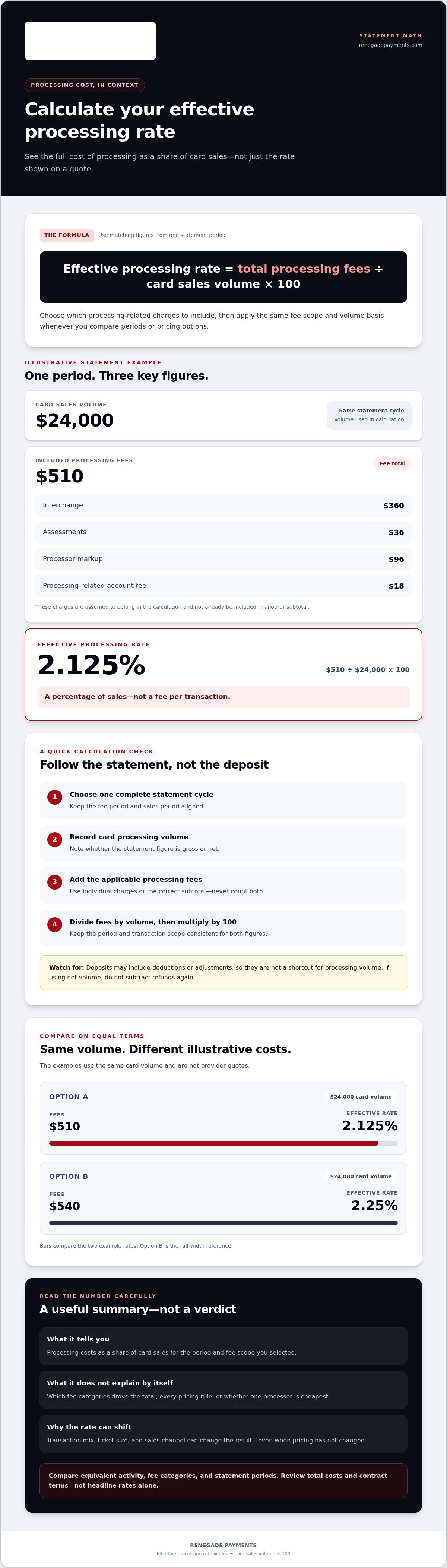
Effective processing rate = total processing fees ÷ card sales volume × 100
For example, if a hypothetical statement shows $300 in processing fees and $10,000 in card sales for the same period, the calculation is $300 ÷ $10,000 × 100 = 3%. The 3% is a percentage of sales, not a $3 fee or the average charge for each transaction. Don’t combine fees from one period with sales from another.
Scope matters, too. Decide which processing-related charges to count, then use the same set consistently. If your fee total includes a particular charge, include it when comparing another period or pricing option. Statement labels may not tell the whole story, so the percentage is only as clear as the figures behind it.
What the Percentage Can and Cannot Tell You
Your effective rate summarizes processing costs against a chosen amount of card sales. It doesn’t explain why those costs reached their total. To investigate, distinguish the main components:
- Interchange is the underlying transaction cost associated with a card transaction.
- Processor markup is the processor’s charge on top of interchange and other applicable costs. With interchange-plus pricing, interchange and a clear fixed markup are shown separately.
- Average fee per transaction is a dollar amount calculated by dividing fees by transaction count. Unlike the effective rate, it measures cost per transaction, not cost as a share of sales.
A single percentage can’t identify which fee categories drove the result, show each pricing rule, or prove that one processor is the cheapest. A higher rate could reflect higher fees, a different transaction mix, or both. Treat it as a useful summary, not a verdict. Inspect the statement details and compare costs on the same basis.
How to Calculate Your Effective Processing Rate From a Statement
Your merchant statement has the figures you need, but its labels and totals can be easy to mix up. Base the calculation on one statement period and one consistent definition of card volume. Don’t use deposits as a shortcut: deposits may reflect deductions or adjustments rather than the processing volume you need.
Find the Matching Processing Volume and Statement Period
Start with a complete statement cycle, then locate the reported card processing volume for that cycle. Check whether it’s a gross or net figure. Handle refunds, voids, and adjustments consistently with the volume figure you select. If the statement reports net volume, don’t subtract refunds again. Before adding fees, note the period, volume figure, and whether the figure is gross or net.
Total Fees and Check the Arithmetic
Collect the processing-related charges you’re including, such as interchange, network assessments, processor markup, and applicable account fees. Statements may show both individual charges and a subtotal that already includes them. Use the correct subtotal or the individual items, not both. Forbes’ Guide to Credit Card Processing Fees outlines common fee components that can help you identify statement entries.
- Choose the period. Use one complete statement cycle.
- Locate card volume. Record the statement’s processing volume and whether it’s gross or net.
- Total applicable fees. Add the processing charges you’ve chosen to include, without duplicating subtotals.
- Divide fees by volume. Keep the same period and transaction scope for both figures.
- Multiply by 100. Convert the decimal into a percentage.
Illustrative example only: Assume a statement reports $24,000 in card volume and lists $360 in interchange, $36 in assessments, $96 in processor markup, and an $18 processing-related account fee. Assume these charges all belong in the calculation and aren’t already included in another subtotal. The fee total is $510. Then calculate $510 ÷ $24,000 × 100 = 2.125%. To calculate your rate, apply the same steps to your verified statement figures.
If fee labels or subtotals are hard to reconcile, a complimentary statement savings analysis can help review processing costs and potential savings.
Use the same statement period, volume basis, and fee scope to compare options. These example figures show how the comparison works, not provider quotes.
| Illustrative option | Fees included | Card volume | Effective rate |
|---|---|---|---|
| A | $510 | $24,000 | 2.125% |
| B | $540 | $24,000 | 2.25% |
The comparison is valid only if both fee totals use the same categories and both volumes use the same basis. A lower percentage is a useful signal, not a full verdict. Check what each total includes before drawing conclusions.
How to Interpret Your Effective Rate Without Misreading It
Your effective rate can change even when your processor hasn’t changed its pricing. It’s a weighted summary of the activity and fees recorded during a chosen period, not a diagnosis of what caused the result. Read it alongside the statement details before deciding whether a change signals a pricing issue.
Two merchants’ effective rates aren’t automatically comparable because their transaction mix, sales channels, and included fees may differ. The same applies when comparing your own months. A rate is useful only when you know what activity and costs sit behind it.
Why Your Rate Can Change From One Month to the Next
Card types, transaction types, sales channels, and average ticket sizes can all affect the weighted cost for a statement period. For example, a shift in the share of online versus in-person transactions may change the fee mix, even if the processor’s markup stays the same. A change in the number of lower- or higher-ticket transactions can also affect how per-transaction charges compare with sales volume.
Volume matters, too. If processing fees include fixed charges, a change in sales volume can alter the percentage even when those charges stay the same. Statement timing may also place activity or adjustments in a different cycle than expected. Don’t assume the rate moved because pricing changed.
Compare complete statement periods using the same volume basis and fee categories. If the rate changes, check whether card mix, channel, ticket size, volume, or adjustments changed at the same time. This helps you distinguish activity-driven movement from new fees or altered pricing.
Effective Rate Versus a Quoted Rate
An effective rate comes from realized statement fees divided by matching card volume. A quoted rate describes proposed pricing, while a processor markup is only one component of cost under some pricing structures. These figures aren’t interchangeable. A quote may exclude fees that appear on a statement, while an effective rate reflects the fee categories included in your calculation.
Before comparing figures, check their scope. Do they cover the same fee types, transaction activity, and time period? A quoted percentage may apply to certain transactions or price components, while your statement percentage rolls up a broader set of costs. With interchange-plus pricing, interchange is separate from a clear fixed markup, so the markup alone isn’t the full processing cost.
Don’t label a provider cheaper based on one headline percentage. Compare equivalent activity and total applicable costs, then inspect the underlying fees and pricing terms. The effective rate can point you toward useful questions, but it can’t answer them by itself.
Use the percentage as a signal, not a verdict. It summarizes what happened during one period; it doesn’t identify every cost driver or explain every pricing rule. Connect the number to the statement activity that produced it, then review changes in both the fee detail and processing mix.
How to Use Calculation to Compare Processing Costs Fairly
Your effective rate gives you a starting point, not a winner. A fair comparison uses the same sales activity, time period, and fee scope for each option. Otherwise, one offer can look cheaper simply because its total leaves out charges included in another.
Make Each Offer Use the Same Comparison Basis
Use your actual processing activity as the baseline. Apply the same statement period and card sales volume to each option, then list every cost included in the comparison. If an estimate assumes a different transaction mix, note that difference rather than treating the percentages as directly comparable.
Build a simple checklist before weighing the options:
- Period and volume: Use the same months or statement cycle and the same card sales amount.
- Fee categories: Record whether the total includes interchange, network assessments, processor markup, and other processing-related charges.
- Activity assumptions: Note assumptions about card types, sales channels, transaction counts, and ticket sizes.
- Terms: Review contract length, recurring charges, one-time charges, and any conditions that affect the total cost.
Compare total costs, not just the quoted percentage or markup. A quoted rate may cover only part of the bill. A markup can be clear and useful, but it isn’t the full amount paid to process cards. Interchange-plus pricing explained separates interchange costs from the processor’s fixed markup, making those components easier to examine. Your comparison still needs to include other applicable fees and use your actual activity.
Keep the assumptions visible. If one option’s estimate uses a different transaction mix, model it separately or recalculate both options using the same mix. Don’t bury the difference inside a single percentage.
Assess Dual Pricing as a Separate Checkout Approach
Dual pricing isn’t simply another quoted processing rate. It presents distinct cash and card prices at checkout, so assess how the structure fits your operations and customer-facing experience. Consider how prices are displayed, how staff explain them, and whether checkout procedures can apply them consistently.
Compare this approach on its own terms. Consider how it would work across your sales channels and day-to-day checkout flow, alongside the costs and operational changes relevant to your business. It won’t suit every operation, and the model alone doesn’t guarantee a particular cost outcome. This guide to dual pricing payment processing covers the approach in more detail.
Once your comparison uses equivalent activity and clearly stated terms, the numbers become more useful. Request a complimentary statement savings analysis to review your processing statement and identify costs and potential savings.
Turn Your Effective Rate Into a Clear Next Step
Your calculation is useful when you can trace it back to the statement. Keep the result with the statement period, card volume basis, and fee categories you included. That record makes it easier to check the math later and compare another period or processing option without changing the rules.
Then inspect the line items. The percentage summarizes the cost, but the statement shows what sits behind it. Look for charges that need clarification, any fee counted twice in your working total, and differences between current costs and a new pricing proposal. Don’t treat a lower percentage as proof of a better deal until the underlying costs and terms match.
What a Statement Review Can Add to the Percentage
A statement review connects the final percentage to the charges that produced it. It can help identify processing costs and potential savings to assess, without assuming that every fee can be removed or that a particular result is guaranteed. Reviewing the statement also makes it easier to examine fee details alongside your calculation.
Renegade Payments’ complimentary savings analysis reviews existing merchant processing statements to identify processing costs and potential savings. It gives you a practical way to move from a single percentage to a closer look at your actual statement figures.
Choose a Practical Follow-Up
Keep these details together before you compare or review your processing setup:
- The statement period used in the calculation.
- The card volume figure and whether it reflects gross or net activity.
- The processing fee categories included in the total.
- Any assumptions about refunds, adjustments, transaction mix, or sales channels.
With that information in hand, assess options against your business rather than a headline rate. Interchange-plus separates interchange costs from a fixed processor markup, giving you distinct components to evaluate. Dual pricing presents distinct cash and card prices at checkout, so consider how that structure fits your operations and customer-facing checkout needs. These are different approaches to assess, not automatic recommendations. The right comparison depends on your processing activity, statement figures, and operational priorities.
If you want to calculate effective processing rate and understand what is driving it, use your statement as evidence, not just as a source for one percentage. Compare equivalent options, check the full fee detail, and keep your assumptions visible. A complimentary savings analysis is a practical next step for reviewing your statement and identifying processing costs and potential savings. Request a complimentary savings analysis and put your actual statement figures at the center of the review.
Make Your Next Processing Decision With Confidence
Your effective rate is more than a number to file away. Use it as a checkpoint for future statements and a baseline when reviewing changes to your processing setup. Keep your calculation assumptions with the result so the next comparison starts with clear, consistent evidence.
Once you calculate effective processing rate, examine what’s behind it. Renegade Payments’ complimentary savings analysis reviews your current merchant processing statements to identify processing costs and potential savings. From there, you can assess options such as interchange-plus processing or dual pricing against your actual activity and business needs. No headline rate should make the decision for you.
Put your statement figures to work. Request a complimentary review of your processing statement and get a clearer view of the costs you’re paying and the options worth considering.
Frequently Asked Questions
What is the formula for calculating an effective processing rate?
Divide the processing fees you’re counting by the matching card sales volume, then multiply by 100. For example, if a hypothetical business records $420 in included fees against $20,000 in card sales, its effective rate is 2.1%. The result depends on the figures and fee scope you choose, so record those details alongside the percentage. That makes the result easier to verify later.
Which fees should I include when calculating my effective processing rate?
Include charges tied to accepting and processing card payments if you want an all-in view of that cost. Decide how to treat account-level charges: include relevant recurring processing charges in your total, but leave unrelated services out. Check whether a statement subtotal already contains individual fee lines before adding them. Otherwise, you may count a charge twice and overstate your rate.
Can refunds make my effective processing rate look higher?
Yes. If refunds reduce the card sales volume you use while some processing charges remain in your fee total, the percentage can rise. The effect depends on how your statement reports refunds and how you define the denominator. For example, don’t subtract refunds from net volume a second time. Note whether your calculation uses gross or net sales, then apply that basis consistently.
Why does my effective processing rate change from month to month?
A rate can shift because your payment activity changed, even if your pricing did not. A seasonal sales period may bring a different mix of card types, transaction sizes, or sales channels. Fixed processing charges can also weigh more heavily in a lower-volume month. To investigate a change, compare statement line items and business activity for each period before concluding that your processor changed its pricing.
Is an effective processing rate the same as an interchange rate?
No. Interchange is a cost associated with processing a card transaction, while an effective rate summarizes the fees you’ve included as a percentage of card sales. Interchange can vary with transaction details, but the effective rate combines the costs in your calculation. Under interchange-plus pricing, interchange and the processor’s markup are distinct components; the markup alone isn’t the effective rate.
Can I compare effective rates from processors with different pricing models?
Yes, if you compare total costs using the same sales volume, transaction mix, period, and fee scope. Don’t compare an interchange-plus markup by itself with another provider’s all-in percentage. Apply each pricing structure to the same set of actual or projected transactions, and include applicable charges and contract terms. That creates a more useful comparison than placing two headline figures side by side.
How often should a business calculate its effective processing rate?
Calculate it for each statement cycle if you want a regular view of processing costs. Keep the calculation method consistent so changes are easier to spot. Recalculate after a pricing change or a major shift in sales channels or transaction mix, since older results may no longer reflect current activity. If you’re comparing options, use a recent, representative period and preserve the assumptions behind your figures.
Frequently Asked Questions
Clear, straightforward answers about payment processing rules, rates, and terms.
Get your free savings
analysis in 24 hours
Upload a recent processing statement and we'll show you exactly how much you can save. No commitment, no pressure, no sales pitch.