Payment Processing for Retail Stores: Compare Fees and Costs
Compare payment processing for retail stores by fees, sales size, card mix, security, and hardware. Find a cost-effective fit for peak-season checkout.
Published

The lowest advertised rate may not be the right choice for a store selling small-ticket items. The best payment processing for retail stores depends on how fees interact with average sale size, card mix, and monthly volume. For shops with many low-value sales, a fixed fee on each transaction can take a larger share of each purchase.
It’s reasonable to want a clear comparison, not a headline rate that obscures the cost drivers. The right setup should fit your sales patterns, protect payment data, and keep checkout moving during seasonal peaks.
This guide explains how interchange-plus pricing and volume discounts affect costs, what to consider when comparing security and hardware, and why peak-season capacity matters. Judge a processing setup by how well it fits your store, not by one rate in isolation.
Key Takeaways
- Compare interchange-plus, flat-rate, and tiered pricing against your sales and card mix, not just the advertised rate.
- Look beyond transaction fees: security practices and dispute costs can affect the real cost of accepting payments.
- Choose checkout hardware that suits your store’s payment needs, then consider how it will handle peak-season traffic.
- For small-ticket sales, assess how per-transaction charges add up across frequent purchases before choosing a pricing model.
Table of Contents
Interchange-plus pricing and volume discounts
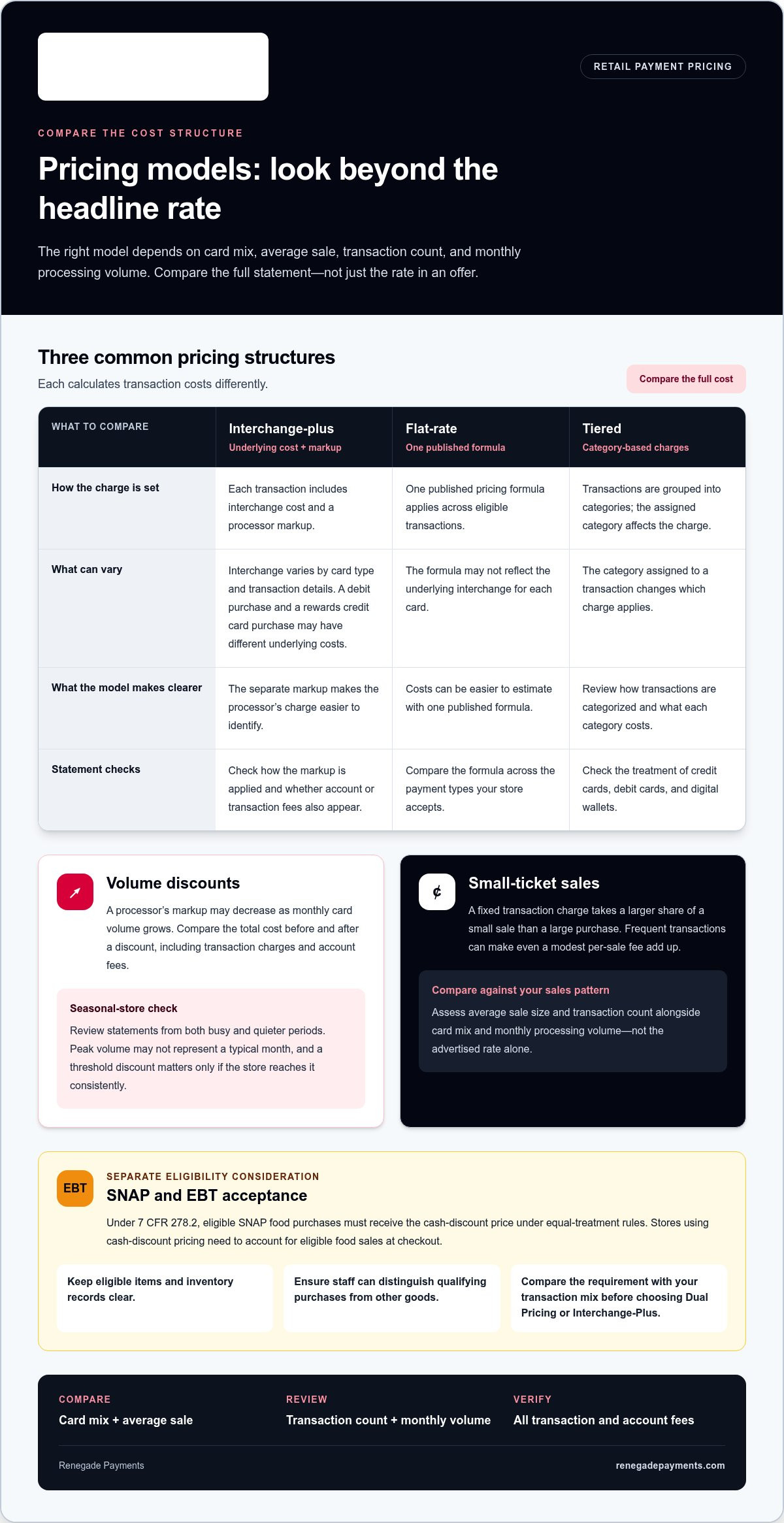
Retail payment processing commonly uses interchange-plus, flat-rate, or tiered pricing. Each structure calculates transaction costs differently. Compare the full statement, not just the rate in an offer. The right model depends on your card mix, average sale, transaction count, and monthly processing volume.
With interchange-plus pricing, each transaction includes the interchange cost and a processor markup. Interchange varies by card type and transaction details, so a debit purchase and a rewards credit card purchase may have different underlying costs. Because the markup is separate, the processor’s charge is easier to identify. Check how the markup is applied and whether other account or transaction fees appear on the statement.
A flat rate applies one published pricing formula across eligible transactions. It can make costs easier to estimate, but it may not reflect the underlying interchange for each card. Tiered pricing groups transactions into categories, and the assigned category affects the charge. If your store accepts credit cards, debit cards, and digital wallets at one terminal, compare how each pricing model treats those payment types.
Volume discounts may reduce a processor’s markup as monthly card volume grows. Compare the total cost before and after the discount, including transaction charges and account fees. Review statements from both busy and quieter periods. A seasonal store’s peak volume may not represent a typical month, and a discount tied to a threshold matters only if the store reaches it consistently.
SNAP and EBT acceptance adds a separate pricing and eligibility consideration. Under 7 CFR 278.2, eligible SNAP food purchases must receive the cash-discount price under equal-treatment rules. That means a store using cash-discount pricing must account for eligible food sales at checkout. Keep eligible items and inventory records clear, and make sure staff can distinguish qualifying purchases from other goods. Compare this requirement with the store’s transaction mix before choosing Dual Pricing or Interchange-Plus.
Payment security and fraud prevention
A secure checkout depends on how payment data moves through the POS system, platform, processor, and card network. Clear security controls can also help limit fraud disputes and protect business operations.
PCI DSS Security Compliance
PCI DSS is a security standard for protecting payment card data, with version 4.0.1 setting out 12 compliance requirements. For a retail business, compliance matters because credit card information passes through checkout systems and related payment processes. Map where card data travels, then understand which systems and staff handle it. That view helps identify where controls need attention and keeps responsibilities visible.
Payment Security Measures
Payment security means protecting card data as a transaction moves from the terminal through the gateway and processor to the card network. Gateways handle payment data under security and technical standards before forwarding it to a processor. Review how each part of your platform handles payment information, and limit unnecessary access to checkout systems. Consistent procedures help staff spot unusual transactions.
Chargeback Management
A chargeback follows a cardholder dispute routed through the card network. The retailer must respond with records supporting the sale, such as the receipt and relevant fulfillment details. Keep records organized by transaction so staff can retrieve them if a dispute arrives. Clear procedures help with both fraud prevention and dispute handling.
Compare the processor’s security practices, dispute fees, and response process as part of the full cost review. For a clearer view of processing costs, compare payment processing costs alongside checkout safeguards.
Processor hardware and peak-season capacity
A retail setup must fit the checkout, payment methods, and sales volume. For stores selling all products in a physical location, POS hardware, offline payment modes, and integrated receipt printers are essential.
What POS hardware does a retail store need to accept payments? At minimum, a point-of-sale terminal processes card payments, while receipt printing supports in-store transactions. Choose hardware that accepts EMV chip cards, contactless cards, and digital wallets such as Apple Pay and Google Pay. Chip and contactless payments can make checkout faster and more secure.
Setup costs depend on the hardware selected and the number of checkout points that need equipment. Compare equipment costs with processing charges, and clarify who owns each device. Ownership matters if you later change systems or add locations.
Integration matters as much as the terminal. POS systems can connect with inventory management and customer relationship management software. A card transaction can automatically reduce stock counts, while linked returns can help keep inventory accurate. Check that the setup supports refunds tied to the original transaction and records returned items against stock. This keeps sales records and inventory aligned.
Assess peak-season capacity separately. A system that slows down or goes offline during a rush can cost sales and frustrate shoppers. Review how the setup handles busy checkout periods, mobile transactions, and offline payment modes. Staff should also be able to learn core checkout tasks quickly so new or seasonal workers can keep lines moving.
How long do retail payment processors take to deposit funds? Retail payment sales are typically credited to the store’s bank account within 24 to 48 hours. Settlement usually starts by the end of the business day, with funds moving from the customer’s bank through the acquiring bank to the retailer’s account. Factor that timing into cash-flow planning, especially during seasonal peaks.
Processing costs for high-volume, low-ticket retail stores
A fixed transaction charge takes a larger share of a small sale than a large purchase. Retailers may process many transactions each day, so even a modest per-sale fee can add up. Compare processing costs with your average ticket size, not just monthly volume.
Volume alone doesn’t tell the full story. A merchant with frequent, low-value credit card sales can have a different cost pattern from a store with fewer, larger purchases. Compare card types, average sale amount, transaction count, and payment channel. Include digital wallets if shoppers use them, then review statements from busy and quiet periods. This shows whether the pricing model fits everyday sales, not just peak volume.
Check every fixed fee alongside the percentage rate. For a high-volume shop, calculate fixed charges across a typical day and month, then add percentage fees and account charges. This makes the cost of small purchases visible instead of burying it in a blended rate.
Batching also affects the cost picture. Retailers should review their batching schedule and settlement terms to understand how they affect costs. If a processor charges per batch, 30 daily batches in a month may appear as separate statement charges. Review batch frequency and fee lines in monthly reporting; don’t confuse a batch charge with a per-sale fee. The distinction helps pinpoint what drives the total.
Use the same sales period to compare pricing models, and separate card volume from transaction count. Then test the result against a low-ticket day, not just a high-volume season. For a corner store selling snacks and household basics, the right fit is the model that prevents repeated small-transaction charges from quietly eroding each sale.
Renegade Payments: Dual Pricing
Renegade Payments offers Dual Pricing for retailers looking to offset credit card processing fees at checkout. It also offers Interchange-Plus, which separates interchange from the processor’s markup. The right fit depends on your store’s sales mix, average transaction, and checkout approach.
If your current statement makes costs hard to trace, Renegade Payments offers a Free Savings Analysis. It reviews your merchant statements to identify processing costs and clarify the figures. Use the analysis to compare your current setup with pricing options suited to your retail business.
For a practical next step, contact Renegade Payments to discuss your processing costs.
Make your next processing decision with clear numbers
Compare how your store actually sells with how its processor charges. Use transaction records to identify what matters most: small-ticket volume, payment mix, or offsetting card costs at checkout. Then choose a pricing approach that fits those priorities instead of chasing a headline rate. That’s the practical test for payment processing for retail stores.
Renegade Payments offers Dual Pricing, Interchange-Plus, and a Free Savings Analysis of current merchant statements. These options can help you examine processing costs and consider a pricing structure that fits your business. Clear figures make it easier to decide whether to keep your current setup or choose another approach.
Contact Renegade Payments to discuss your processing needs and take the next step with confidence.
Frequently Asked Questions
Quick Answer: What Is the Best Payment Processing for Retail?
The best payment processing for retail stores matches your average sale, payment mix, and sales channels. A shop with frequent small purchases should pay close attention to per-transaction charges. A store handling higher-value sales may focus more on percentage fees. Compare total statement costs across typical trading periods, then consider checkout needs, security, and how customers prefer to pay.
What Are the Different Types of Payment Methods for Retail?
Retailers can accept cash, debit cards, credit cards, and mobile payments through digital wallets. Some stores also support online payments or mobile-app purchases alongside in-person checkout. SNAP and EBT may apply to eligible food purchases. Each method affects checkout flow differently, so a grocery store, clothing shop, and online retailer may prioritize different combinations based on products and shopping habits.
How can the right retail payment system help?
The right system can make it easier to serve shoppers across in-store, online, and app-based channels. For example, a customer might buy online and return an item at a physical location. Connected payment records can help staff trace the sale and process the return through the appropriate channel. For stores with several locations, centralized reporting can bring sales, voids, and refunds into one view.
What are the average credit card processing rates for retail businesses?
Retail merchants pay an average of 2.7% per credit card transaction, while credit and debit card processing costs can range from 1.5% to 3.5% of a sale. These are broad market figures, not a quote for an individual store. Your total depends on the pricing model, card mix, transaction details, and any separate account charges shown on your statement.
What payment methods should retail stores accept?
Start with the payment methods your customers use and your store can support reliably. Many retailers consider cash, debit and credit cards, and contactless mobile wallets such as Apple Pay or Google Pay. A shop that sells online may also need online payment acceptance. Food retailers can consider SNAP and EBT for eligible purchases. Match payment methods to your products and sales channels.
How much do retail payment processors charge per transaction?
Retail processors don’t all charge the same transaction fees. A fixed charge matters more on a low-priced item than on a higher-value purchase. Compare the percentage, fixed charge, and account fees with your average ticket and transaction count.
Frequently Asked Questions
Clear, straightforward answers about payment processing rules, rates, and terms.
Get your free savings
analysis in 24 hours
Upload a recent processing statement and we'll show you exactly how much you can save. No commitment, no pressure, no sales pitch.