How to Choose a Processor and Switch Credit Card Processing
Switch credit card processors without disrupting sales. Compare fees, contracts, equipment, and integrations; test payments before closing your old account.
Published

Switching credit card processors shouldn’t put your sales on hold. For most small businesses, the process takes one to three weeks from application to cutover, while the disruptive cutover itself is usually completed in under an hour. Keep your current account active until the new one is processing transactions and deposits are arriving.
It’s smart to look beyond a tempting headline rate. Contract terms, equipment, payment workflows, and software integrations can all affect the cost and smoothness of the move. A lower rate won’t help if invoices stop syncing or customers can’t pay in the field.
This guide explains what to compare, how to map your integration needs, and how to switch step by step. You’ll learn how to review current costs, plan around equipment and recurring payments, test the new setup, and close the old account only after the new process is working.
Key Takeaways
- Review your contract’s end date, cancellation terms, renewal clause, and equipment obligations before you plan a switch.
- Compare the full processing cost, not just the advertised rate, and account for when deposits reach your bank.
- Map how payments connect to your POS, invoicing, accounting, and customer workflows before choosing a processor.
- Test real transactions and deposits on the new setup before closing your old account.
Table of Contents
Want to Switch Credit Card Processors?
Before changing payment providers, review your contract, equipment, and cancellation terms. These details determine how quickly you can move and whether additional costs apply.
-
Review Contract Terms and Fees
Read your current contract and note its end date, renewal clause, and cancellation deadline. Some payment processing contracts, including those offered through banks, run for three years. Automatic renewal may apply unless you give notice within the stated window. Follow the notice process and keep written proof. Ask the new processor to provide transition terms in writing.
-
Check POS Fees and Lease Terms
List each terminal and note whether you own or lease it. A leased equipment agreement usually continues until its end date, even after you change processors, and may leave you with another year of payments. Check return deadlines, too. Some terminals can be reprogrammed, while others are locked. You may be able to keep your existing POS, but don’t assume its merchant account transfers with it.
Check security before reusing equipment. Some older machines don’t comply with PCI DSS requirements. Ask whether PCI compliance support is included or charged as a monthly add-on.
-
Plan Contract Cancellation
Compare the cancellation date with your contract’s end date before sending notice. If the agreement allows cancellation at term end, deliver notice within the stated window and save written confirmation. To estimate switching costs, add any applicable early termination fee, POS changes, and remaining equipment lease payments. These costs depend on your agreements and equipment. Keep the old account active until the new setup works. Test payment collection and confirm deposits arrive before closing the old account in writing.
Before switching, disclose every payment service you use, including check verification, gift cards, and online gateways. This gives the new processor a clear picture of your integration needs.
What should a payment processor offer?
Compare the full cost and fit, not just a headline rate. Use recent statements, payment workflows, and deposit timing to assess each offer.
-
Compare Processor Offers and Costs
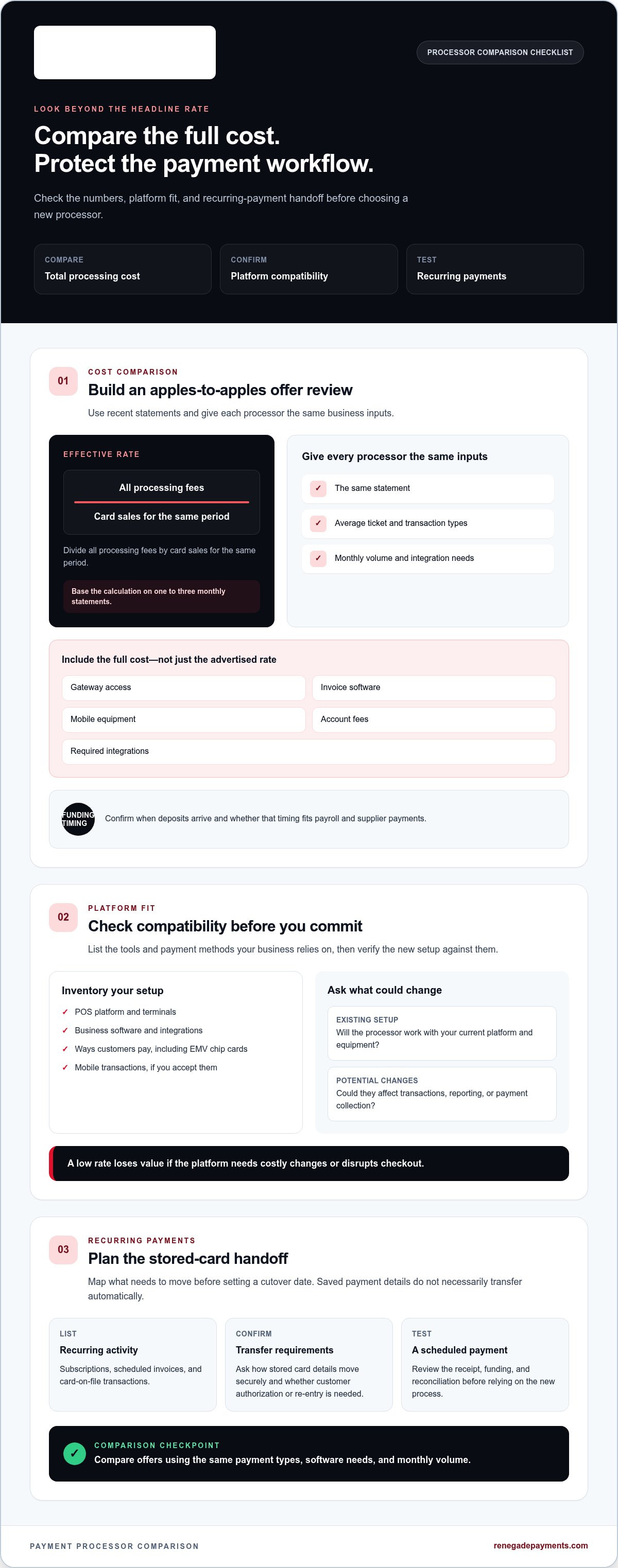
Use one to three monthly statements to calculate your effective rate: divide all processing fees by card sales for the same period. Give each processor the same statement, average ticket, transaction types, monthly volume, and integration needs. Compare the total, including gateway access, invoice software, mobile equipment, account fees, and required integrations. Then confirm when deposits arrive and how funding timing fits payroll and supplier payments. For a clearer pricing comparison, review dual pricing options alongside your current model.
-
Check Platform and EMV Compatibility
List the POS platform, terminals, and software your business uses before comparing merchant services. Ask whether a processor will work with your existing setup or whether changes could affect transactions, reporting, or payment collection. Confirm that the terminal accepts EMV chip cards and supports the ways customers pay, including mobile transactions if you accept them. A low rate loses value if your platform requires costly changes or disrupts checkout.
-
Transfer Recurring Payments and Stored Cards
Inventory subscriptions, scheduled invoices, and card-on-file transactions before choosing a cutover date. Recurring payments may need to move to the new processor, and customer authorization may be required. Ask how stored card details can be transferred securely and whether customers must re-enter them. Never assume saved credentials will carry over automatically. Test a scheduled payment and review its receipt, funding, and reconciliation before relying on the new process.
Choosing a processor based on integration
Choose a processor that fits how your business accepts payments and records each job. Map every customer payment from acceptance through deposits, reconciliation, and accounting.
- Map each payment type your business needs to accept. For a contractor, that may include mobile terminal payments at the job site, keyed payments, invoice links, card-on-file transactions, and ACH. Include deposits, progress payments, recurring service plans, and final balances. A processor that handles only in-person transactions may leave office staff juggling separate tools for invoices and scheduled payments.
- List the software that must receive payment data. Include job-management, accounting, CRM, and scheduling systems, then trace what each one needs. For example, a completed invoice may need to show the amount paid, remaining balance, payment method, and deposit status. Confirm the proposed processor supports the integrations your workflow depends on, not just a connection to a terminal.
- Test the full workflow before choosing a new processor. Run a sample job from estimate to deposit, partial payment, final balance, and reconciliation. Check that staff can match each transaction to the right customer and job, and that accounting records reflect the payment method. Include refunds and failed payments in the test. If the system relies on separate gateways or manual entry, factor that work into your comparison.
- Match the pricing structure to your transaction mix and reporting needs. Ask for a written breakdown that clearly separates interchange from processor charges. An interchange-plus model passes the underlying card cost through at cost, alongside a fixed processor markup, which can make statements easier to review. Compare offers using the same payment types, software needs, and monthly volume. Choose the setup that supports daily operations, not just the simplest sales pitch.
Switching credit card processors
Plan the move as a controlled payment processing transition, not a sudden account shutdown. Keep the old service available until the new one handles real payments and deposits.
- Give the new processor a complete list of payment services, including card processing, check verification, gift cards, and payment gateways. Put transition details in writing, including account setup, equipment changes, and the cutover sequence. Underwriting timelines vary by business and processor, so allow time for approval and setup before scheduling the switch.
- Set up and test the new account before canceling the old one. Confirm your POS systems and terminals are configured before cutover. Some existing equipment can be reprogrammed; wireless or sophisticated machines may need shipping. Reusing a universal terminal may save hundreds or thousands of dollars. Ask for reprogramming fees in writing, and check whether PCI compliance support is included or charged monthly.
- Choose a quiet cutover window and keep both providers running during the transition. A processor switch usually takes one to three weeks from application to cutover, while the disruptive cutover for most small businesses is usually under an hour. Check receipts, refunds, batches, and deposits before relying on the new setup.
- Move recurring payments with care. Customer authorization may be required when stored payment details move to the new processor. Keep the old account active until the new account has processed transactions and deposits have arrived. Leave enough funds in the former account for potential chargebacks, and close it in writing once the new process is stable. Refunds for past transactions may still reach the old account for months after switching.
Want a clearer view of your payment costs before making the move? Review your processing costs.
Renegade Payments: Dual Pricing
Renegade Payments offers Dual Pricing for businesses reviewing how card costs appear at checkout. It can be relevant when you want to consider a pricing approach that offsets credit card processing fees through checkout pricing. Clear customer communication and consistent pricing across payment channels matter when evaluating this model.
For a closer look at your current processing costs, Renegade Payments offers a Free Savings Analysis based on your merchant statements. Interchange-Plus is another option for businesses seeking pricing tied to each card’s actual interchange cost and a separate processor markup. These models address different priorities, so compare them against your payment mix and operating needs.
If you’re weighing a processor change or pricing model, contact Renegade Payments to discuss your next step.
Make Your Next Processing Decision Deliberately
Changing processors is a business decision, not just a payment setting. Choose a setup that supports how you sell, collect, and reconcile, then plan the transition carefully. Written details and a tested workflow give your team a practical path forward.
If you’re weighing how to switch credit card processors, Renegade Payments offers a Free Savings Analysis to review your merchant statements. You can also compare Dual Pricing, for in-person payments, with Interchange-Plus pricing for in-person and online transactions. The right next step is a direct comparison against your business’s payment mix and needs, not a pitch built around a headline rate.
Contact Renegade Payments to discuss your processing options. Take the next step with a clearer view of your choices and a plan that fits how your business operates.
Frequently Asked Questions
Is It Worth Switching?
It’s worth switching when the expected savings or better payment fit outweighs the cost and work of changing providers. Compare your current fees with the complete new offer, then include any exit costs and operational changes. A lower transaction rate, for example, may not help if the new setup adds manual reconciliation or disrupts a payment workflow your staff depends on.
What Happens to Refunds After I Switch?
Refunds for earlier purchases may still be processed through your former account for months after switching. Keep access to that account and its transaction records, and leave funds available for refunds or chargebacks. Make sure staff know which provider handles each older sale. A customer returning an item bought before the change may need the original transaction located in the old system.
What’s involved in getting it right?
Reduce transition errors by assigning clear owners to setup, testing, and customer-facing changes. Document who updates payment links, checks settlement records, and handles refunds during the overlap. Run through a realistic sale from authorization to reconciliation, including a declined payment and a refund. This can expose gaps in staff instructions and reporting before the new process becomes routine.
Will I Lose Sales While Switching?
Reduce the risk of missed sales by keeping a working payment option available during the changeover. Schedule the cutover when customer traffic is quieter, and make sure staff know the fallback process if a terminal or payment link fails. Test both in-person checkout and an invoice payment before relying on the new setup for every customer.
How do you switch credit card processors without disrupting payments?
Set up the new account before ending the old service, then move payment channels in a planned sequence. Test checkout, invoices, refunds, and deposit records with staff who use each workflow. Keep a written cutover checklist at the register and with the person managing online payments. Close the previous account only after the new process is handling customer payments correctly.
How do you compare credit card processors for transaction rates, monthly fees, and features?
Compare offers using the same card sales, transaction types, and business needs, then separate percentage charges from per-transaction and account fees. Check whether the offer includes the functions you rely on, such as payment links, reporting, or mobile acceptance. A simple comparison sheet can expose tradeoffs: record each charge, feature, funding arrangement, and workflow change side by side.
Frequently Asked Questions
Clear, straightforward answers about payment processing rules, rates, and terms.
Get your free savings
analysis in 24 hours
Upload a recent processing statement and we'll show you exactly how much you can save. No commitment, no pressure, no sales pitch.