How Dual Pricing Works: A Clear Guide to Checkout
Learn how dual pricing works at checkout. See how displaying cash and card prices upfront builds customer trust, streamlines POS setups, and cuts confusion.
Published
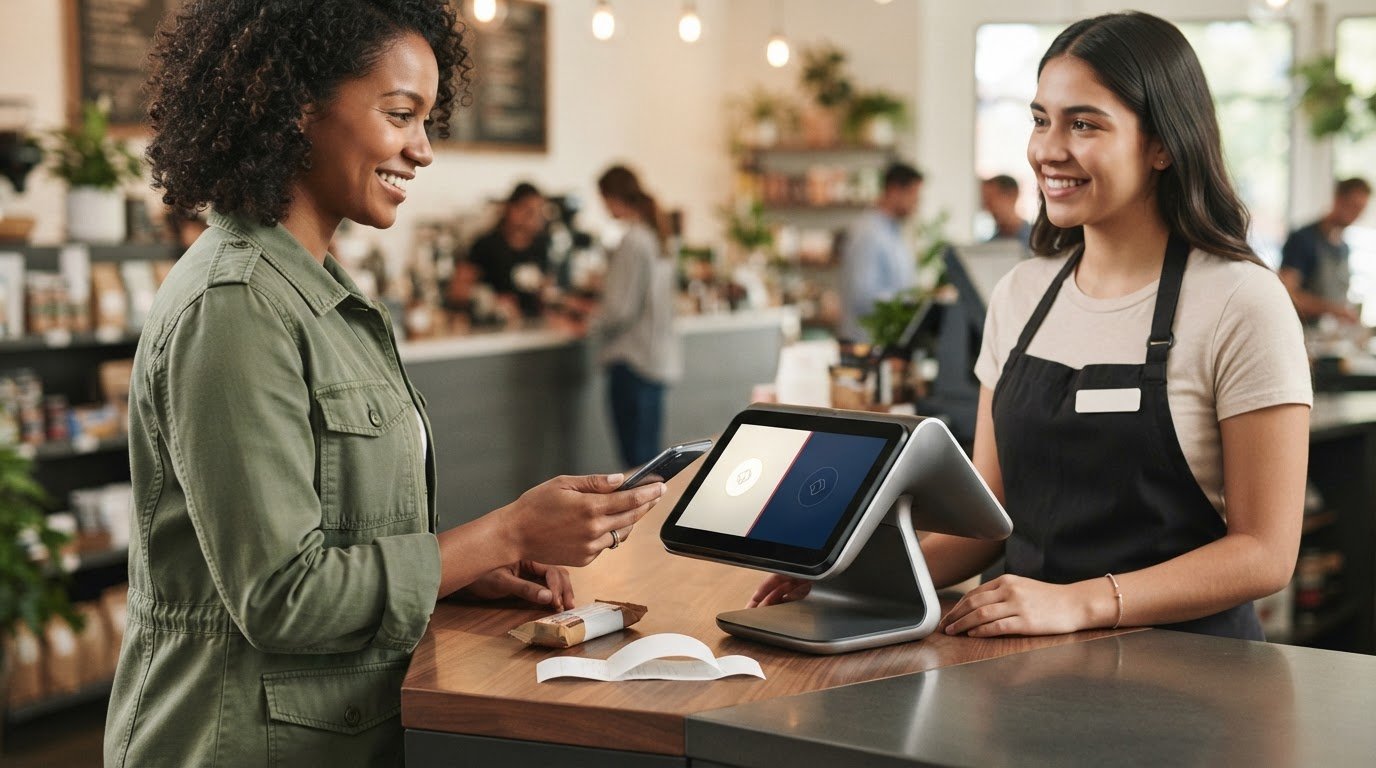
Two prices build trust when customers see both before they choose how to pay. That’s the core of how dual pricing works: the cash price and card price appear upfront, rather than as an extra charge after a customer selects a card.
That distinction matters. If the checkout total changes without a clear explanation, customers can feel caught off guard, and staff are left to explain the difference at the register. Clear pricing sets expectations before payment begins. The customer chooses a payment method, the POS applies the matching price, and the receipt records the completed sale.
This guide follows that process from the displayed prices through payment, receipt, and settlement. You’ll see what merchants need to configure, what to communicate to customers, and why dual pricing shouldn’t be treated as a guaranteed savings promise. Renegade Payments provides dual pricing and interchange-plus processing, along with a complimentary savings analysis of current merchant statements. Start with the checkout facts, then compare processing options using your own records.
Key Takeaways
- Learn how dual pricing works, from displaying two prices for one purchase to matching the selected payment method at checkout.
- See how the customer’s choice shapes the amount paid and what the receipt should show.
- Use consistent signage, menu wording, POS settings, and staff explanations to reduce checkout confusion.
- Assess whether the model fits your customer mix and day-to-day checkout workflow before making a change.
- Use current processing records to compare options and assess operational impact without assuming a guaranteed result.
Table of Contents
How Dual Pricing Works: Two Prices, One Clear Choice
Dual pricing means customers see a cash price and a card price for the same purchase before choosing how to pay. The amounts aren’t prices for different versions of an item. They’re the two displayed prices for one item, with the payment method determining which applies. Customers can compare the options and understand the total before they reach the payment decision.
The idea of showing different prices for different payment methods has a broader history. The historical dual-track price system provides context for this approach beyond modern checkout technology. In a retail or service transaction, the practical test is simple: both prices must be visible before the customer commits to paying.
Dual pricing presents the cash and card prices for a purchase before payment selection; it does not add a new fee after a customer chooses a card.
What does a customer see before paying?
Both prices can appear wherever customers make a buying decision. A restaurant might show them on a menu. A shop might display them on a shelf label or sign. A service business might put them on a written price list, while the POS can repeat the amounts at checkout. The format can vary, but the timing can’t: customers need the information before they choose a payment method.
For example, a customer sees a cash price and a card price on a shelf label, then brings the item to the register. The cashier can repeat the options if needed, but shouldn’t reveal a previously undisclosed amount only after the customer says they’ll pay by card. Place the prices where customers can see them before that decision, and make sure they remain legible at checkout.
What is the merchant’s role in the price difference?
The merchant sets the two prices and communicates them through the business’s payment setup. That means deciding where customers encounter the information and making sure the checkout process follows the same presentation. A sign that shows both prices won’t help if the POS can’t apply the right one. The display and transaction flow need to agree.
The card price is the amount presented for a card transaction. It isn’t a lower displayed price followed by an unexpected add-on at the register. A customer should be able to compare the options, choose how to pay, and recognize the selected price in the completed sale.
Understanding how dual pricing works also means keeping expectations grounded. The model changes how prices are presented and applied; it doesn’t guarantee that every business will eliminate all payment-processing costs. The actual outcome depends on the business’s pricing and processing setup. Start with a simple standard: show both prices clearly, then make the selected payment method match the price the customer saw.
How Dual Pricing Works Step by Step at the POS
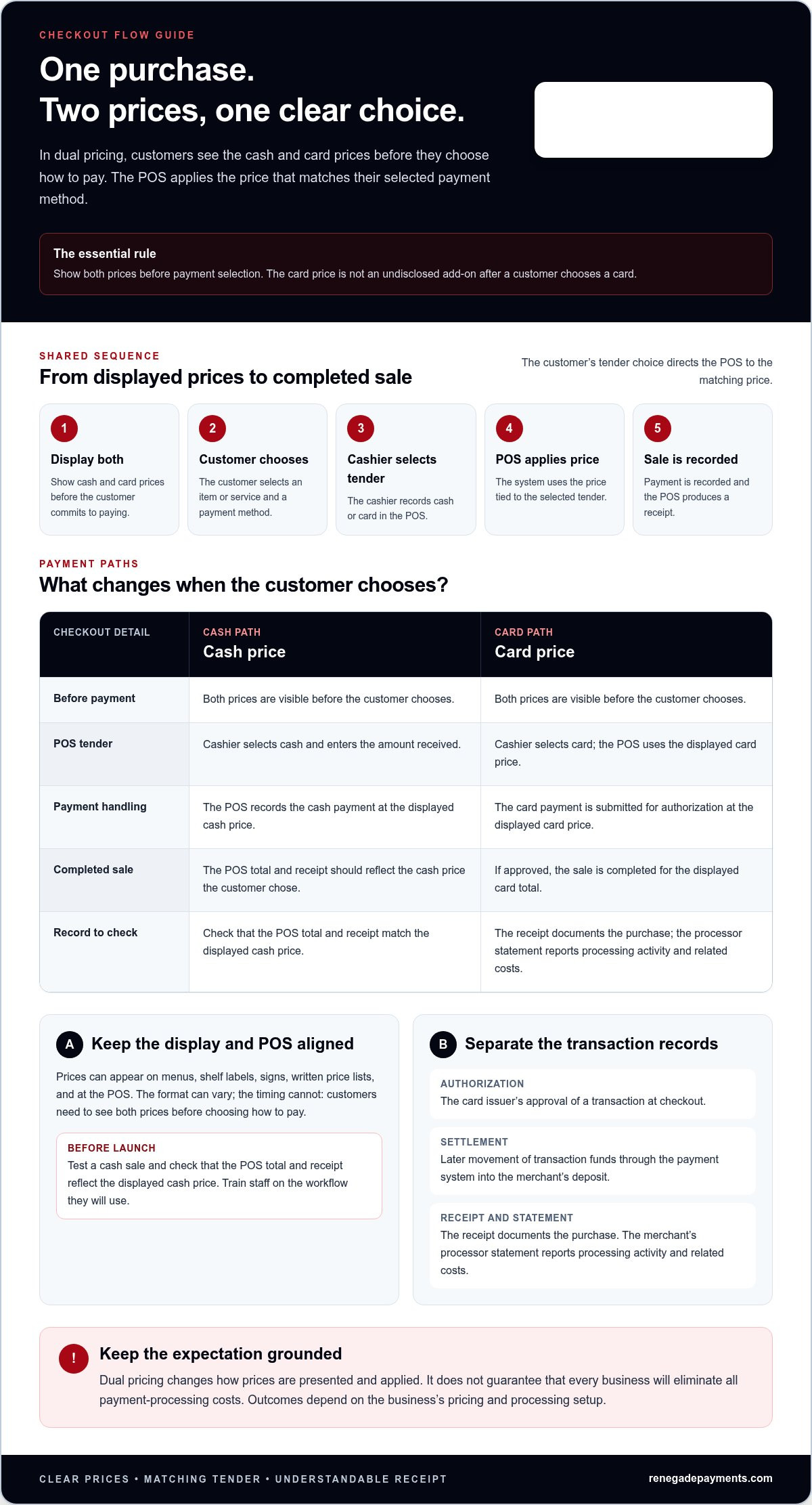
The checkout should follow the same logic the customer saw before reaching the register. The POS must apply the price tied to the selected payment method, then record the completed sale. Screens differ by system, but the transaction should never turn a disclosed price into an unexpected charge.
- Display both prices. Show the cash and card prices before the customer commits to paying.
- Customer chooses. The customer selects an item or service and decides which payment method to use.
- Cashier selects the tender. The cashier records cash or card in the POS. The system should use that selection to apply the matching price.
- POS processes payment. Cash is recorded as a cash payment. For a card, the payment request is sent for authorization using the displayed card price.
- Receipt records the sale. The POS produces a receipt that reflects the completed purchase and payment.
From displayed prices to receipt, the POS records the customer’s chosen tender and applies its matching price.
What happens when the customer chooses cash?
The cashier selects cash as the tender and enters the amount received. The POS applies the displayed cash price and records the payment. The exact screens and steps depend on the system, so train staff on the workflow they’ll actually use. Before launch, test a cash sale and check that the POS total and receipt reflect the displayed cash price.
The receipt should make the completed transaction understandable. It should show the items and total in a way that matches the price the customer chose. If the customer asks about the difference, staff can point to the prices displayed before payment and explain that the total corresponds to the cash option.
What happens when the customer chooses a card?
The cashier selects card as the tender, and the POS uses the card price already shown to the customer. The customer presents or enters the card details, and the payment is submitted for authorization. If approved, the transaction is completed for that displayed total. The card isn’t charged an undisclosed surcharge added after the choice.
Keep the stages separate. Authorization is the card issuer’s approval of the transaction at checkout. Settlement happens later, as transaction funds move through the payment system and are included in the merchant’s deposit. The customer’s receipt documents the purchase. The merchant’s processor statement reports processing activity and related costs. These records serve different purposes, so a receipt shouldn’t be treated as a breakdown of the merchant’s processing expenses.
To check whether your records align, compare a sample POS sale and receipt with the related processor statement. A merchant statement review can help you examine current processing costs alongside available payment structures. Keep the core test simple: the customer sees the price, the POS applies it, and the receipt records it.
Follow a Dual-Pricing Transaction from Display to Receipt
A transaction is easy to follow when every stage tells the same story. The customer sees two prices for one item, chooses a payment method, and pays the matching amount. The POS records that choice, and the receipt reflects the sale. Here’s the same generic purchase traced through both payment options.
How do the two displayed prices appear in practice?
A business might show both prices on a menu, shelf label, sign, online listing, or POS screen. The format depends on the business and its payment setup. What matters operationally is consistency: customers should be able to connect the price shown before checkout with the amount presented at payment. The example below uses labels, not set prices or a universal display format.
| Transaction stage | Cash choice | Card choice |
|---|---|---|
| Sees | One item with a cash price and a card price | One item with a cash price and a card price |
| Selects | Cash | Card |
| Pays | The displayed cash price | The displayed card price |
| POS record and receipt | Sale and tender reflect the cash choice | Sale and tender reflect the card choice |
The key control point is whether the POS record matches the selected tender and corresponding price. If the customer selects cash but the POS records a card sale, or the screen applies the wrong price, the record no longer matches the transaction the customer chose. Test both payment paths before using the setup with customers, and train staff to catch a mismatch before completing a sale.
What should the receipt make clear?
The receipt is the customer’s record of the purchase, not a copy of the merchant’s processing statement. It should identify the item and show a completed total that corresponds to the selected payment method. The POS may also record the tender type. The specific receipt format and any required details depend on applicable rules and how the system is configured, so don’t assume one layout or exact wording fits every business.
Keep the display consistent across customer touchpoints. If an online listing presents both prices, the in-store sign and checkout screen shouldn’t create a different impression. A customer who sees one item and two prices should be able to recognize the selected price on the POS and receipt without decoding unfamiliar labels.
Processing records and deposits sit on a separate track. The checkout price tells the customer what they paid. Later settlement and merchant records show how payment activity is processed and reported. Don’t treat the deposit amount as a rewrite of the price on the receipt. Understanding how dual pricing works means following both records while keeping their purposes distinct.
Prevent Confusion When Customers Pay Under Dual Pricing
Clear prices are only half the job. Customers also need a consistent explanation, and staff need a POS process they can follow without improvising. A sign that says one thing while the register does another creates doubt. Set the routine process and exception steps before the first transaction.
- Match every display. Keep signage, menus, online listings, and POS screens aligned on which price applies to cash and which applies to card.
- Check the POS flow. Test tender selection and confirm that it applies the corresponding price before completing a sale.
- Train every shift. Give staff one plain explanation and rehearse common customer questions.
- Write down exception steps. Set procedures for declined cards, tender changes, refunds, voids, and split payments.
How can staff explain the choice in plain language?
Keep the answer neutral and point to what the customer saw: “The two prices are shown here. The total depends on whether you pay with cash or card.” Staff should use wording that matches the sign and POS display. Don’t blame the customer, call the card price a penalty, or describe a new amount as though it appeared only after the payment choice.
If a customer changes their mind, pause and follow the tender-change procedure. The POS record and final total should reflect the payment method actually used. If a card is declined, staff should explain the next step without silently switching the transaction to another price or tender.
What operational details should merchants settle first?
Decide how staff will handle a refund, void, split payment, or payment-method change, then practice those steps in the POS. A partial cash and card payment can raise questions about which price applies, so define a consistent workflow rather than leaving each cashier to make a separate judgment. Use the same process across shifts and sales channels, and update training when the setup changes.
Keep operational guidance separate from compliance advice. How dual pricing works at the register is a workflow question; whether a particular display or practice meets current rules depends on applicable requirements. For rule-specific detail, direct staff and decision-makers to the dedicated dual-pricing compliance resource, and keep customer-facing explanations focused on the prices and choices presented.
Clear procedures protect the customer experience and make transactions easier to review. Renegade Payments can help assess processing costs and available structures through a complimentary merchant statement review, giving you practical records to consider alongside your checkout workflow.
How to Evaluate Dual Pricing for Your Business
Don’t judge dual pricing by a headline savings claim. Judge it by how your business sells, how customers pay, and what your processing records show. A model that looks simple on paper still needs clear price displays, a POS workflow staff can handle, and a customer experience that fits your sales channels.
What should a merchant review before deciding?
Start with your merchant statements. Review processing costs alongside transaction patterns, including how often customers use different payment methods and whether sales vary by channel. These records give you a practical baseline for comparing your current setup with another structure. They won’t predict every future result, but they replace guesswork with evidence from your own business.
Then walk through the customer experience from discovery to checkout. Consider where customers see prices, such as a menu, product listing, or in-person display. Check whether the same explanation can carry across online and face-to-face sales. If your channels present prices differently, staff and customers may have to reconcile inconsistent information.
- Checkout clarity: Can customers understand the available prices before choosing how to pay?
- Customer mix: Do observed payment patterns make the model worth evaluating for your business?
- POS workflow: Can the system apply the correct price and record the selected tender consistently?
- Implementation effort: What changes to displays, training, and daily procedures would be needed?
Be realistic about the work involved. How dual pricing works at checkout depends on more than the price display. Staff must understand the process, and the POS setup must support it. Results depend on business operations and implementation. Dual pricing doesn’t guarantee that every processing cost will disappear or that the approach will fit every business.
How can a statement review support the decision?
A statement review can turn the decision into a practical comparison. Renegade Payments reviews merchant statements to identify processing costs and assess potential options, including dual pricing and interchange-plus. Interchange-plus is another processing structure to consider when comparing how costs are presented. The goal is to compare available structures against your records, not to assume one choice will produce a particular outcome.
Pair that review with an operational check. Map the customer’s path through each sales channel, note the POS changes required, and identify the training staff will need. Then compare those requirements with your current processing records. That gives you a clearer basis for deciding whether the model fits both your numbers and your day-to-day business.
For a practical next step, request a complimentary savings analysis. Use the findings to compare your current processing costs with available options, then make the decision based on clear records and a workable checkout plan.
Make Your Next Payment Decision With Clear Evidence
Turn what you’ve learned about how dual pricing works into a practical decision for your business. Review your current processing records and map the changes a new setup would require. A useful comparison should account for both the numbers and the work involved, including customer communication, staff training, and POS adjustments.
There’s no universal outcome to assume. Renegade Payments offers complimentary merchant statement reviews and dual pricing and interchange-plus processing options, so you can compare structures against your actual records rather than rely on broad promises. Use that information to decide whether a change makes sense for your operation.
Ready to assess your options? Request your complimentary savings analysis to compare processing options using your current records and checkout needs.
Frequently Asked Questions
Is dual pricing the same as adding a surcharge?
No. Dual pricing presents separate cash and card prices before the customer chooses a payment method. A surcharge is an additional charge applied to a card transaction, which can be subject to different rules. Timing and presentation matter: don’t label a fee added after selection as a cash discount. Before setting up either approach, review the current rules that apply to your business and payment setup.
Can a customer change payment methods after checkout begins?
Usually, a customer can ask to switch before the sale is completed, but the cashier must follow the business’s POS procedure. For example, if a card is declined and the customer offers cash, staff should update the tender and verify that the system recalculates the total for that choice. If authorization already succeeded, don’t simply change the register entry; follow the process for reversing or correcting the completed transaction.
What should a receipt show under dual pricing?
A receipt should give the customer a usable record of the completed purchase, including the items, final total, and payment details generated by the POS. The record should make sense alongside the price option the customer selected. For example, if the customer chose the card price, the receipt total should match the amount submitted for that transaction. Exact receipt fields can depend on local requirements and system configuration.
Can dual pricing work for online orders?
It can be implemented online if the ordering flow clearly presents both prices before the customer chooses how to pay, and the checkout system can apply the matching amount. Test the full path on product pages, carts, and mobile checkout. Watch for totals that change late or payment buttons that don’t make the applicable price clear. Online sales still need consistent customer communication and a reliable order record.
Does dual pricing apply to debit cards as well as credit cards?
Don’t assume debit and credit transactions can be handled identically. Surcharge rules for debit cards are distinct, and a dual-pricing setup must be configured and communicated according to applicable laws and payment-network requirements. Confirm how the system identifies each tender type and what price it applies. Clear labels alone aren’t a substitute for checking that the program’s treatment of debit transactions is appropriate.
Can a merchant refund a dual-priced transaction?
Yes, merchants can process refunds, but staff should follow a defined procedure that matches the original sale and the business’s refund policy. The POS should help locate the transaction and record the returned amount against it. Train employees on partial refunds, exchanges, and cases where the original payment method isn’t available. Keep the refund record with the sale details so the customer and business can trace the adjustment.
Frequently Asked Questions
Clear, straightforward answers about payment processing rules, rates, and terms.
Get your free savings
analysis in 24 hours
Upload a recent processing statement and we'll show you exactly how much you can save. No commitment, no pressure, no sales pitch.