Compare no-fee processing options and their real costs
Compare payment processing without hidden fees, uncover add-on charges, and choose a pricing model based on real costs. Assess all fees and features, too.
Published

Zero-fee processing doesn’t make card transactions cost-free. It means the merchant pays no monthly processing fee, while transaction costs may still be covered through the pricing model or at checkout. Payment processing without hidden fees means understanding where those costs go before choosing a plan.
That distinction matters. A “zero-fee” label can sound simple, but monthly charges, gateway fees, PCI compliance costs, and other add-ons can change the real total. The fee isn’t gone if it’s simply harder to spot.
This guide explains how zero-fee processing works, which businesses may benefit, and how it compares with other payment options. You’ll also see what to weigh beyond the headline rate: total costs, support, uptime, and useful features. The goal is clear arithmetic, so you can judge whether an option fits the way your business accepts payments.
Key Takeaways
- “Zero-fee” processing doesn’t automatically mean cost-free; compare how each option handles transaction costs and added charges.
- Estimate your processing costs using transaction size and sales volume, then compare pricing models on the same terms.
- Interchange-plus pricing separates underlying interchange and network costs from the processor’s markup.
- Include monthly, gateway, PCI compliance, and other fees when weighing the real cost, alongside uptime, support, and features.
- Renegade Payments offers Dual Pricing, Interchange-Plus, and a Free Savings Analysis to help businesses examine processing costs.
Table of Contents
What is Zero-Fee Credit Card Processing?
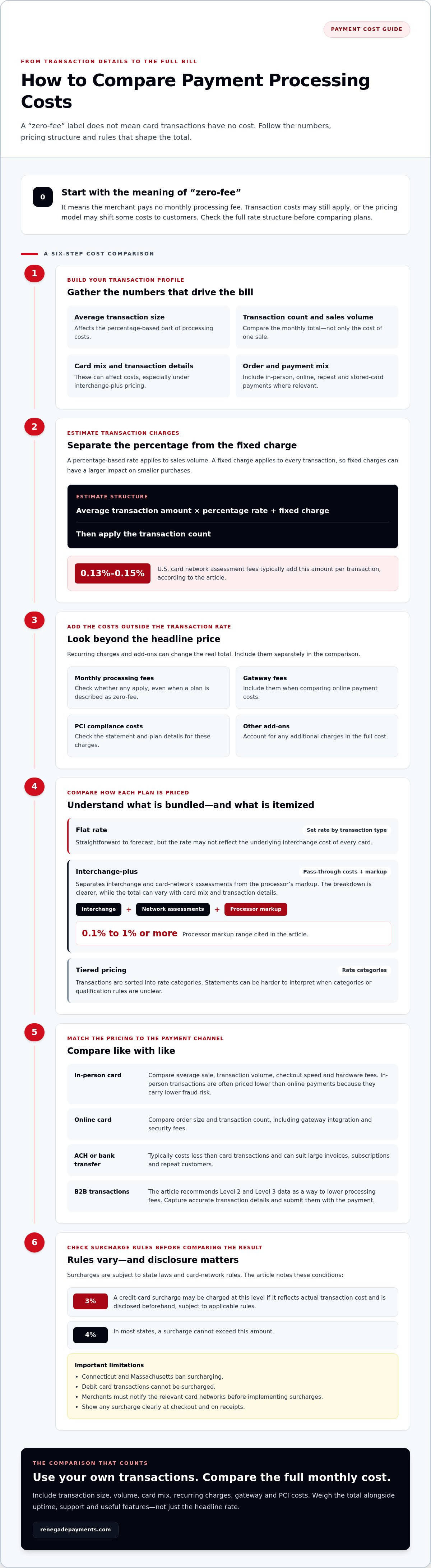
Zero-fee processing means the merchant pays no monthly processing fee. It does not mean card transactions have no cost. Transaction charges may still apply, or the pricing model may shift some costs to customers. Review the full rate structure before treating “zero-fee” as a meaningful cost comparison.
Start with transaction size and volume. U.S. Card network assessment fees typically add 0.13%-0.15% per transaction. Estimate costs by multiplying the average transaction amount by the percentage rate, adding the fixed charge, then applying the transaction count. Include recurring charges separately.
A percentage-based rate applies to sales volume, while a fixed charge applies to every transaction. Fixed charges can have a larger impact on smaller purchases. Businesses with higher transaction volume should compare the monthly total, not just the cost of one sale.
| Payment option | Typical pricing detail | Best comparison point |
|---|---|---|
| In-person card | Average sale and transaction volume | Retail checkout speed and hardware fees |
| Online card | Order size and online transaction count | Gateway integration and security fees |
| ACH or bank transfer | Usually costs less than card transactions | Invoice size and repeat-payment needs |
| Customer surcharge | Applicable state and card-network rules | Compliance limits and checkout disclosure |
In-person credit card transactions are often priced lower than online payments because they carry lower fraud risk. ACH or direct bank payments typically cost less than card transactions and can suit large invoices, subscriptions, and repeat customers. Stored payment methods can simplify repeat transactions, but compare the charges across your full transaction volume.
U.S. surcharge rules require careful disclosure. A business may charge a 3% credit-card surcharge if it reflects actual transaction cost and is disclosed beforehand, subject to state laws and card-network rules. Connecticut and Massachusetts ban surcharging. Debit card transactions cannot be surcharged, and in most states a surcharge cannot exceed 4%. Merchants must notify the relevant card networks before implementing surcharges. Show the charge clearly at checkout and on receipts.
Cash discounts offer a different way to present prices, while interchange-plus separates actual interchange and network costs from processor markup. Compare each approach against your average transaction size and sales volume. Then negotiate using the full statement, not just the headline rate with Renegade Payments.
Which Business Types Benefit from No-Fee Merchant Services?
For small businesses and online stores, the best fit depends on transaction size, sales volume, and the pricing model. A transparent flat rate can be easier to forecast, while interchange-plus can make the processor’s markup clear. Compare total costs using your own transactions, not a generic “no-fee” label.
Interchange-plus separates three parts of card payments: interchange, card-network assessment fees, and processor markup. Interchange and assessments pass through as underlying costs, while the provider adds its stated markup. This structure helps merchants see how card type and transaction details affect costs, rather than blending every charge into one rate.
Processor markups can range from 0.1% to 1% or more. The difference matters across sales volume, especially for businesses that process frequent card payments. To compare offers, use a recent statement and calculate the processor markup separately from interchange and assessments. Include monthly charges in the same comparison so a low markup doesn’t distract from the full bill.
Flat-rate pricing bundles processing into a set rate for each transaction type. It’s straightforward to forecast, but the rate may not reflect the underlying interchange cost of every card. Interchange-plus passes through actual interchange costs and network fees, then adds the processor’s markup. The breakdown is clearer, but the total can vary with card mix and transaction details.
Tiered pricing sorts transactions into rate categories. Statements can be harder to interpret when categories or qualification rules aren’t clear. A small retailer with simple, consistent sales may value the predictability of flat-rate pricing. A business with varied card types, larger sales volume, or detailed transaction data may prefer the itemized view of interchange-plus.
B2B merchants have another lever: transaction data. The page recommends Level 2 and Level 3 data for business-to-business transactions as a way to lower processing fees. These data levels add transaction details, so businesses should capture accurate information at checkout and submit it with the payment. Missing or incomplete fields can affect how the transaction is categorized.
Online stores should compare pricing against their actual order mix and transaction count. A small average order and frequent purchases can make per-transaction charges more noticeable; larger invoices make percentage-based costs more influential. For repeat business, include stored-card transactions in your volume estimate and compare their pricing with other card payments.
Use interchange-plus when you want to examine processor markup against pass-through costs. A clear interchange-plus pricing breakdown can help frame that comparison.
Look for processors that clearly disclose a flat rate or itemize interchange, assessments, and processor markup. The best fit depends on your transaction size, sales volume, and card mix. Compare the full cost using your own transactions, including any applicable charges.
Monthly, annual, gateway, and PCI compliance fees
A search for payment processing without hidden fees should start with the full statement, not the advertised transaction rate. Compare recurring charges, transaction charges, and the services each charge covers.
Monthly and Annual Fees
Subscription fees cover access to a processing platform, while transaction rates apply to individual payments. Zero-fee processing means the merchant pays no monthly processing fee, but the label doesn’t explain every possible charge. Compare the billing period and included services with the transaction pricing.
For a clear comparison, list each subscription separately from charges triggered by transactions. A plan with no monthly fee may still have other costs, so payment processing without hidden fees depends on understanding the complete pricing structure.
Gateway and PCI Compliance Fees
A payment gateway connects online checkouts with processing. These charges differ from a processor subscription: gateway fees relate to payment routing, while PCI costs relate to card-data security standards.
PCI requirements still apply when a platform advertises no monthly processing fee. Include gateway and PCI charges in your annual comparison, then add any transaction costs. This shows which platform expenses sit outside the headline rate.
Minimum and Account Maintenance Fees
A monthly minimum may apply when a business doesn’t generate enough processing charges to meet the required monthly total. Account maintenance fees cover administrative overhead and can appear separately from transaction pricing. A minimum depends on processing activity; maintenance relates to keeping the account active. Review both against a low-volume month.
Compare the monthly minimum with actual processing charges on a statement. If they fall below the required total, the minimum can change the bill. Record account maintenance separately so it isn’t mistaken for a card processing rate.
Batch and Swipe Fees
A batch fee can apply each time a business finalizes that day’s transactions. A swipe fee relates to card acceptance, so its impact depends on transaction count. Compare both with percentage-based credit card processing rates. A batch charge follows settlement activity; a swipe charge follows individual card payments.
Use a recent statement to count batches and card transactions, then identify matching charges. Compare the total with transaction rates and subscriptions. This method reveals costs a rate-only comparison can miss.
To assess payment processing without hidden fees, group statement charges by billing schedule and trigger. The right pricing option depends on transaction mix, sales volume, payment channels, and platform needs; the exact figure is provided in a quote for your case.
Balancing processing costs with uptime, support, and features
A low rate means little if checkout fails during a busy shift. Compare processing costs with uptime, support, and the tools your business actually uses.
Nine out of 10 merchants end up overpaying because payment-processing pricing models are complex. Don’t compare credit card fees alone. Put transaction charges, monthly fees, software, equipment, and contract terms side by side. Then weigh each against the cost of a failed payment or a feature your team cannot use.
Test the payment flow your customers depend on. For a physical store, review checkout and settlement steps. For an online shop, assess how the platform handles payment failures and order records. Check support options and response processes in the contract. A cheaper plan can cost more operationally if an outage blocks sales or staff can’t resolve a payment issue.
POS software should fit the work, not inflate the bill. A smaller operation may not need advanced reporting or inventory tools. List the functions staff use daily, then compare software costs against those needs. Avoid paying recurring monthly fees for features that don’t support sales, reconciliation, or stock control.
Separate terminal and equipment charges from processing rates. Identify whether equipment is charged upfront, through recurring payments, or within a contract. Then note who handles replacements and what happens if the business changes platforms. These terms affect the real commitment even when the advertised transaction rate looks low.
Cross-border payments add another comparison: the transaction currency and any currency conversion charge. Review how the platform displays the amount customers pay, the currency used for settlement, and where conversion costs appear on statements. A business selling internationally should compare a typical foreign-currency transaction from authorization through settlement, not just its domestic card rate.
Use this comparison sequence before choosing:
- Calculate: Add transaction charges, monthly fees, software, and equipment costs.
- Test: Map how a payment moves through checkout, approval, and settlement.
- Review: Read contract terms for support, equipment, and platform changes.
- Match: Keep features that support your actual sales and reporting needs.
Choose the option that balances total processing costs with dependable operations. A clear comparison should show what each charge pays for and how the service supports your checkout.
Identifying PCI compliance and other hidden fees
To find payment processing without hidden fees, compare itemized statements and terms, not just the advertised rate. Transparent pricing means understanding what triggers each charge and what service it covers.
PCI Compliance Charges
Unlike transaction charges, these relate to card-data security standards rather than individual payments. Merchants still need to comply with PCI standards, and that work may involve additional fees. Compare the PCI line item with the service description and billing period.
Check whether the statement bills PCI compliance monthly or annually. Separate it from security or account charges, even if the provider groups them under a broad label. That makes the fee easier to compare across statements.
Other charges can hide in transaction details. Some processors add 1%-3% for non-qualified transactions.
- Statement fees: Some processors charge to generate statements; paperless delivery may avoid the charge.
- Terminal fees: Match equipment charges against the contract and statement.
- Monthly minimums: Compare the required processing total with actual activity.
- Subscriptions: Separate platform access from transaction charges.
Negotiating Fees and Avoiding Charges
Merchants can negotiate by bringing a recent statement, separating processor markup from pass-through costs, and identifying recurring charges they don’t use. About 65% of merchants who negotiate were able to lower at least one processing fee, according to a 2023 survey cited in the research. Focus on specific line items, not just the headline rate.
Match every fee to a service or event. Compare the pricing model, subscription, terminal terms, and contract exit costs before choosing the cheapest option. Payment processing without hidden fees starts with itemized terms and a like-for-like comparison.
For your case, the exact processing figure depends on transaction mix, sales volume, payment channels, and pricing model; it is provided in a tailored quote.
Review transparent payment options against the charges on your statement.
Renegade Payments: Dual Pricing
Renegade Payments helps businesses compare processing options when statements and checkout costs need a clearer review. Its Dual Pricing approach offsets credit card processing fees at checkout, giving businesses a way to present payment pricing differently.
For a closer look at current charges, the Free Savings Analysis reviews merchant statements to identify hidden processing costs. That can help you see which fees deserve attention before comparing a new pricing model. Interchange-Plus offers another option, separating interchange and network costs from the processor’s markup.
Choose based on how you accept payments and what your statement shows. Dual Pricing may suit businesses seeking to offset card fees at checkout; Interchange-Plus may suit businesses seeking a more itemized cost structure. Contact Renegade Payments to discuss which option fits your processing needs.
Make Your Next Processing Decision With Clear Numbers
Turn your payment statement into a decision tool. Set your priorities first: how you want customers to see pricing, how much detail you need in your rate structure, and which charges deserve a closer look. This gives you a practical basis for choosing payment processing without hidden fees, rather than relying on a low headline rate.
Renegade Payments offers a Free Savings Analysis to review merchant statements, along with Dual Pricing and Interchange-Plus options. Use the analysis to identify processing costs, then compare the options with the way your business accepts payments. The right fit should make the pricing structure understandable and align with your checkout approach.
Bring your statement and your priorities into the conversation. Contact Renegade Payments to explore your options and take the next step with greater clarity.
Frequently Asked Questions
How Do No-Fee Credit Card Payments Work?
“No-fee” describes who pays the processing cost, not whether card processing has a cost. A pricing arrangement may shift that cost to the customer at checkout, or the merchant may cover it through another pricing structure. Before enrollment, compare the customer-facing price, merchant charges, and payment types covered. Check how each price appears on signage, checkout screens, and receipts so customers see the terms before paying.
How do payment gateways compare in terms of cost?
Compare gateways by separating recurring platform charges from transaction charges and any bundled processing costs. A gateway may be billed separately, while another setup combines gateway access with processing. Put every charge into one comparison, then test it against your transaction count and online sales volume. Also consider whether the gateway supports the checkout and reporting functions your store needs, rather than choosing on its headline charge alone.
What are hidden fees to watch for?
Look for charges whose names don’t explain their trigger. Examples include address verification checks, non-qualified transaction adjustments, statement generation, chargeback handling, and contract termination. Sort statement entries into recurring charges, transaction-triggered charges, and one-time charges. Then match each entry to a service or event. This makes it easier to spot duplicate billing, unfamiliar adjustments, or a fee that continues after you stop using a feature.
What if my customer refuses to pay the extra fees?
Explain the checkout price before processing the payment, then offer available payment methods without pressuring the customer. Depending on your setup, options may include paying the posted cash price or using a bank transfer, which typically costs less than card transactions. If the customer declines every option, follow your stated pricing policy and keep the transaction transparent. Don’t add a charge unexpectedly after the customer has agreed to buy.
What is Cash Discounting?
Cash discounting gives customers a lower price when they pay with cash, instead of adding a fee to a card transaction. The customer sees the pricing difference before choosing a payment method. Keep the displayed prices and receipt consistent with the checkout total.
What is Surcharging?
Surcharging adds a disclosed charge to a credit-card transaction; it is different from reducing the price for cash. Debit card transactions cannot be surcharged. Card-network requirements also apply, so merchants need to distinguish a surcharge program from a cash discount before changing checkout prices.
What strategies can reduce processing costs?
Start with a recent statement and identify the processor markup, recurring charges, and transaction adjustments. Negotiate specific line items rather than asking only for a lower headline rate. For business-to-business payments, submit Level 2 and Level 3 transaction data where applicable. You can also compare ACH for suitable invoices or repeat payments, since bank transfers typically cost less than card-based transactions.
What are the typical credit card processing rates and transaction fees in the US?
U.S. Compare these benchmarks with your card mix and complete statement.
Frequently Asked Questions
Clear, straightforward answers about payment processing rules, rates, and terms.
Get your free savings
analysis in 24 hours
Upload a recent processing statement and we'll show you exactly how much you can save. No commitment, no pressure, no sales pitch.